

BME Web 9.0 SP-0126 (January Service Pack)
Index
| S. No. | Enhancements | Details |
|
|
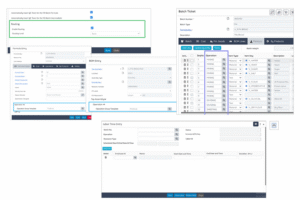
Routing Module | Advanced Routing Capability: The Production Setup screen is now enhanced with Routing section. |
|
|
Customization Module | Enhancements on Custom Master Design Screen: The Module Name lookup field now obtains both Normal and WMS profile modules. A new Setup Type option provided under Type field of the Other Information screen (Special function). |
|
|
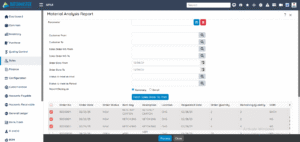
Sales Module | Introduced a new Material Analysis Report. |
|
|
SDS Module | Legacy SDS Compatibility: Introduced a new SDS Module. |
|
|
BatchMaster Web Integrations | Finance Upload/Download: QB Desktop, and SAGE 300 Integration. |
|
|
Setup Module | Regional Format: Company Information screen enhanced with Currency Code and Currency Locale fields. |
|
|
Admin Module | Power BI Setup: A new Power BI Setup screen. |
|
|
Sales/Purchase Module | Email Layout: Emailing feature for Telerik Reports is enhanced further so as to fetch the defaults including Recipient’s mail id. Sales Order Entry & Purchase Order Entry screens. |
|
|
Admin Module | Display Toolbar Button: A new Toolbar Setting button provided on Custom Fields Configuration screen. |
|
|
Customization Module | Telerik Report Design: A new Report Selection For Web Designer screen. |
|
|
Admin Module | Add-on option on Admin: A new ADD-ON option provided on Module field of the Default Setup screen. |
|
|
Admin Module | Customization Upload/Download Utility: A new Custom Library Uploader screen. |
Advanced Routing Capability
BatchMaster Web is now enhanced with routing manufacturing workflow, a system designed to give you precise control over every stage of your production, from initial setup to final reporting. It all begins with Production Setup, where you can choose between basic or advanced level of routing. From there, you will define your operation, specifying whether tasks are performed by human labor or machinery and create Operation Group Templates to establish reusable, standardized sequences for consistent execution. These elements are integrated during Formula and BOM Entry, where materials and labor resources are linked directly to their respective operations.
At the Process Cell Formula Capacity, you can set specific sequences, run times, and mandatory flags. When you are ready to start, the system handles the complete process from batch creation till batch close.
Customization Capabilities in WMS
Enhancements on Custom Master Design and Report Generation Screen
The Custom Master Design and Report Generation screens are now enhanced to support WMS (Warehouse Management System) modules in addition to Normal modules. With this enhancement, you can:
- Create Custom Forms for WMS
- Create reports to be added in Inquiry & Reports and Sales Reports modules of WMS
- All existing functionalities remain as before
Material Analysis Report
Material Analysis Report has now been provided in BatchMaster Web. It helps evaluate the raw materials required to fulfil the Sales Orders and verify material availability. Users can apply multiple filtering parameters to produce a focused and accurate report and can choose to see either a summarized or detailed view of the report.
Legacy SDS Compatibility
The SDS system that was earlier available only in the desktop version is now added to BatchMaster Web. It lets you manage all SDS information in one place in a clear and standard way. This upgrade helps create, report, and share SDS documents more accurately and as per regulations. With better master data control and helpful tools, it reduces manual work, improves tracking, and makes the whole SDS preparation process faster and more reliable.
Finance Upload/Download
Finance upload and download facility is provided for different Finance Packages supporting the Packages installed on the same server and also the ones hosted externally.
QB Desktop
The new Finance Upload/Download Utility for BatchMaster Web – QuickBooks Desktop introduces a streamlined, secure, and highly configurable integration framework that simplifies financial data synchronization between the two systems.
This feature enables users to effortlessly upload finance masters and transactions from BatchMaster Web to QuickBooks Desktop and vice-a-versa.
SAGE300
The integration between BatchMaster Web and SAGE 300 creates a clear and reliable way to sync important financial master data between the two systems. It allows information to flow smoothly from BatchMaster Web to SAGE 300 and vice versa, helping keep both operational and financial data consistent.
Regional Format
The Regional Format enhancement in BME Web ensures that all numeric values are displayed according to the formatting rules of the selected Currency Locale. Since different regions use different decimal separators, thousand separators, and digit‑grouping patterns, this feature helps prevent misinterpretation of numeric data. Once the Currency Code and Locale are selected at the company level, the system automatically applies the respective number format across all screens and reports.
Power BI Setup
A new Power BI Setup screen is introduced to store the values required by BME Web to interact with Power BI.Through this screen, users can enter and maintain Power BI credentials – Tenant ID, Client ID, Client Secret, and Workspace ID – for the selected company.
Once configured, the application is enabled to publish dashboards, access analytics, and retrieve reports directly from Power BI, ensuring seamless connectivity.
Emailing Defaults for Telerik Reports
This enhancement focuses on better automation, consistency, and ease of use. The system now automatically fetches the recipient’s email address when user tries to mail the Purchase Orders or Sales Orders. This email Id is fetched from Vendor Master and Customer Master screens.
This removes the need for manual entry, reduces errors, and ensures emails reach the correct recipient, with clear rules defining when auto-fetch applies. Email Layout Master has been enhanced with new document types – Invoice, Quotation/Sales Requisition and a system-level “Other” fallback.
A structured priority logic is introduced to help the system choose the right email subject and body based on user-level or global settings. These improvements offer better control, consistent communication formats, and reliable fallback options to ensure smooth email processing across all document types.
Auto-Fetch Recipient Email ID – Conditions & Exceptions
- Auto-fetch works only for Purchase Order and Sales Order.
- Auto-fetch is triggered only when printing & emailing through Telerik interface.
- Auto-fetch applies only from specific entry points:
- Line-Level Print action (Listing Page)
- Header-Level Print action (Listing Page)
- Special Function (Record-Level Screen – Mail To Vendor / Customer)
- Line-Level Action
- Fetches email id only if single vendor/customer in context
- Header-Level Action
- If single record selected → Email Id is fetched.
- If multiple records with same vendor/customer → Email Id is fetched.
- If multiple records with different vendors/customers → Email Id is NOT fetched (ambiguous recipient).
- Record-Level Special Function:
- Email Id is fetched from respective Vendor/Customer Master.
- If document is printed from the Reports section (main Reports menu) → Email Id is NOT auto-fetched.
- If document type is other than PO or SO → Email Id is NOT auto-fetched.
- If Vendor Master “Attention E-Mail” field is blank → Email Id will not populate.
- If Customer Master “Contact Email” field is blank → Email Id will not populate.
Email Layout Master – Conditions & Fallback Logic
- New document options added:
- Invoice
- Quotation / Sales Requisition
- Other (fallback)
- Layout selection follows strict priority order:
- User-Level – Document Specific
- Global-Level – Document Specific
- User-Level – “Other”
- Global-Level – “Other”
- If none of the above layouts exist
- Subject and Mail Content remain blank.
- User must enter details manually.
Dependencies
- Vendor Master must have Attention E-Mail populated for PO auto-fetch to work.
- Customer Master must have Contact Email populated for SO auto-fetch to work.
Display Toolbar Button
Facility to hide seldom used special function buttons and to decide the sequence of the remaining ones.
In BatchMaster Web, a new customizable special functions toolbar enhancement provides Admin users with greater flexibility and control over how special functions are displayed, resulting in a cleaner and more intuitive interface tailored to the needs of different user groups. This enhancement improve overall usability by allowing Admins to hide unused special functions, reducing on‑screen clutter and ensuring that you only see the role relevant options. With this enhancement, Admins can hide or rearrange Special Functions for specific screens and apply these settings either to individual users or across all users as needed.
This enhancement is available across several critical screens that include multiple specialized functions, such as Product Cost Analysis, Physical Property Analysis, Purchase Order, Sales Order, Batch Entry, Batch Ticket, Batch Close, and others.
Telerik Report Design
The Telerik Report Design facility allows users to create new reports and edit existing ones as needed. This enables users to modify report layouts and formats according to business requirements, user preferences, or regulatory standards – without impacting the underlying transactional data.
Addon Option on Admin
The Default Setup screen now includes an Add‑On option in the dropdown next to the Module field. When selected, the system displays all available add‑ons. Administrators can choose to show or hide the settings of a specific add‑on by turning that Add‑On on or off. This provides better control over module‑level feature access and configuration.
Customization Upload/Download Utility
This Enhancement allows you to upload company-specific customization files, which are then downloaded based on version checks. In BatchMaster Web, a new Custom Library Uploader screen is provided to deploy custom code libraries to specific company databases. This screen allows administrators to upload the required customization files.