

BME Web 9.0 SP-1025 (October Service Pack) Enhancements
Index
| S. No. | Enhancements | Details |
| 1. | BatchMaster Web | Embedded Power BI with Fabric. |
| 2. | Setup Module | The MPS Setup screen is now enhanced with Daily Calendar, Weekly Calendar, and Monthly Calendar new fields. |
| 3. | NPD/SRM Module | The Lab Note Book tab on the Sample Management screen in now enhanced with advanced AI-driven capabilities. Generate Formula Using AI, generate Nutritional Label Using AI, and edit the formula Using AI. |
| 4. | WMS – MES Module | Verification feature on the WMS RM Issue screen. |
| 5. | BatchMaster Web | Chatbot Security: Direct URL access to the Ask BME Chatbot via the bookmarks or external links is restricted. |
| 6. | Setup Module | The Email Layout Master screen is now enhanced with Invoice, Quotation/Sales Requisition, and Other options provided under the Screen Name dropdown field. |
| 7. | Customization Module | On the Custom Master Design screen, a new Price data type is now supported. |
| 8. | Production Module | A new Print MBR/BMR Setup screen is now provided to set the printing defaults for the Batch Manufacturing Record (BMR) or Master Batch Record (MBR). |
Option to add “Embedded Power BI with Fabric” in BME Web
Unlock deeper insights and empower data-driven decisions with our new business intelligence capabilities. We’re integrating Power BI with Microsoft Fabric, providing robust analytics and real-time reporting directly within your BME Web 9.0 experience.

Interactive Power BI Dashboards
- Access intuitive data visualizations and comprehensive reporting for critical business metrics.
Unified Microsoft Fabric Integration
- Leverage a powerful, unified data platform for advanced analytics and streamlined data governance.
Robust Data Warehouse Foundation
- Ensure reliable, scalable insights powered by a high-performance, integrated data warehouse.
Benefits:
- Real-time insights directly within your application.
- Enhanced user engagement through interactive visuals.
- Secure data access with role-based controls.
- Eliminates need for switching between tools.
- Customizable dashboards matching application design.
AI-Powered Sales Forecasting
The MPS Setup screen is now enhanced with Daily Calendar, Weekly Calendar, and Monthly Calendar new fields to specify the settings for daily, weekly, and monthly planning horizons used to generate AI forecasts via the AI Forecast Entry screen. These newly introduced fields facilitate better precision and flexibility for generating AI forecasts. The inventory planners can now align forecast generation with flexible planning horizons for improved strategic inventory decisions.

The Daily Calendar field is now provided for specifying the daily calendar used to generate AI forecasts via the AI Forecast Entry screen for each individual day within the selected date range. You can use this field if you need high-resolution demand visibility, short‑term planning, or support for day-by-day operational scheduling. The Daily Calendar lookup field retrieves all the planning calendars maintained via the Planning Calendar screen located under the MPS module. From the available options, select the appropriate calendar to be used on a daily basis.
The Weekly Calendar field is now provided for specifying the weekly calendar used to generate AI forecasts via the AI Forecast Entry screen for each calendar week (or configured week period) in the selected date range. You can use this field if you require a mid-level planning horizon that smooths daily volatility and supports weekly ordering cycles. The Weekly Calendar lookup field retrieves all the planning calendars maintained via the Planning Calendar screen located under the MPS module. From the available options, select the appropriate calendar to be used on a Weekly basis.
The Monthly Calendar field is now provided for specifying the monthly calendar used to generate AI forecasts via the AI Forecast Entry screen. You can use this field if you require long‑term planning, budgeting, and strategic inventory decisions where a trend-focused view is adequate and short‑term fluctuations are ignored. The Monthly Calendar lookup field retrieves all planning calendars maintained via the Planning Calendar screen located under the MPS module. From the available options, select the appropriate calendar to be used on a monthly basis.
 It is mandatory to maintain data on these newly provided Daily Calendar, Weekly Calendar, and Monthly Calendar fields before you generate the AI forecast data via the AI Forecast Entry screen (under the MPS module). Otherwise, the system displays the following error message while generating the forecast on the AI Forecast Entry screen.

AI-Powered Product Formulation in SRM/NPD
The Lab Note Book tab on the Sample Management screen in now enhanced with advanced AI-driven capabilities to facilitate faster product development, and manage easily via AI.

Using the Sample Management screen you can now:
- Generate Formula Using AI feature for efficiently creating draft formulations based on the entered prompt. AI generated formula saves time and reduce manual errors.
- Generate Nutritional Label Using AI to generate nutritional labels directly obtained from formula data, ensure tedious manual calculations simplified to auto generation.
- Edit the formula Using AI in an intelligent way to modify and optimize existing formulas, helping teams to refine products efficiently to meet new requirements or quality improvements.
A new AI Operations option is now provided on the Lab Note Book tab on the Sample Management screen. To access AI‑powered tools for formula creation, updates, and nutrition label generation, move on to the Lab Notebook tab. Click the AI Operations dropdown option. The available options in the dropdown are:
- The Create Formula option is now provided to generate a new formula automatically by AI prompt. Instead of manually designing a formula, the AI interprets you natural language input and generate a structured formula accordingly. Create Formula option saves time, reduce manual effort, and ensures efficient formula creation.
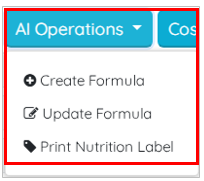
- The Update Formula option is now provided to refine or modify an existing formula using AI capabilities. The BatchMaster Web AI capability analyze the current formula and apply updates based on the user instructions. The modification instruction can be adjusting ingredient proportions, adding/removing components etc. This option is provided for obtaining flexibility to adjust formulas quickly, ensures correctness, and supports iterative development without starting from scratch.
- The Print Nutrition Label option is now provided to generate a nutrition label automatically using BatchMaster Web AI, based on the finalized formula and serving size inputs. The BatchMaster Web AI calculates nutritional values and formats them into a standardized label. This is for ensuring compliance with labelling standards, and provides easy‑to‑use labels for packaging or reporting.
To begin generating a new formula using AI, while acknowledging system disclaimers, use the Create Formula option. The system displays a disclaimer message to inform you about the terms of use associated with the AI-generated responses. Click the OK button.

On clicking OK button, the system displays a prompt window. Write a prompt in your natural language to create a formula. Say, for instance, write “Create a formula for mixed fruit jam for producing with 3kg quantity.”

Click the Create button to execute the BatchMaster AI process for automatically creating a formula based on your entered prompt. The system generates the formula via AI for the written prompt as shown below:
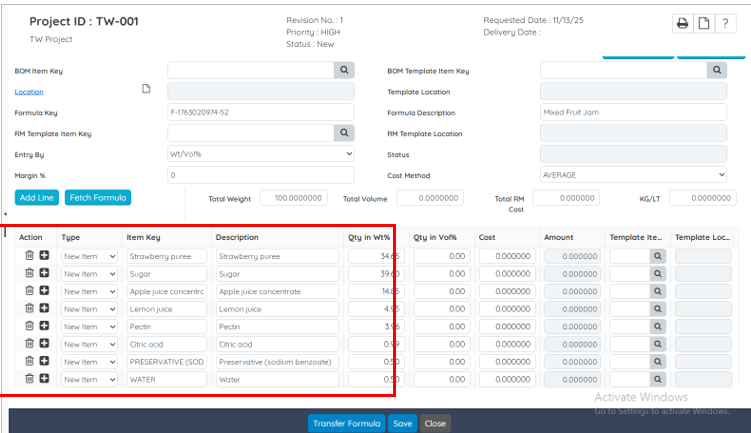
Similarly, you can update an existing formula and print nutritional label using AI.
Weighing – Verify Weighed Quantity
This feature ensures that every weighed quantity is independently validated before being accepted in the system. It reinforces accuracy, prevents incorrect recordings, and adds an extra layer of control to weighing operation.’
Benefits
- Stronger Control
- Higher Data Accuracy
- Clear Accountability
- Compliance-Friendly
- Reduced Fraud or Misuse
- Improved Process Reliability
The Module Setup screen is now enhanced with a new field Allow Verification on Weighing.
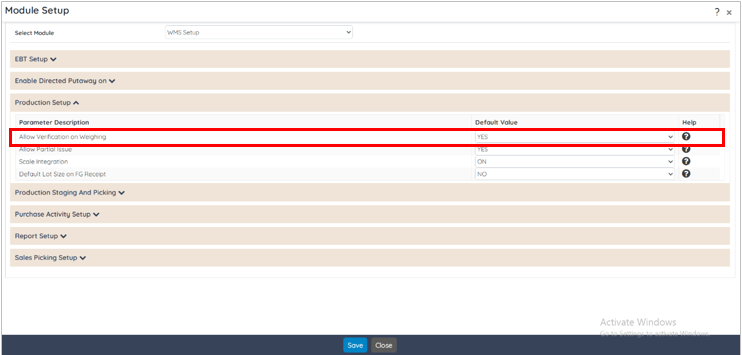
When this option is set to Yes, the system enables a verification feature on the WMS RM Issue screen.
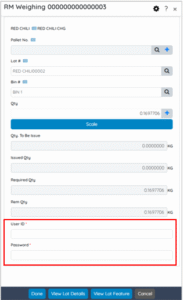
The verifier who enter User ID and Password must be an active user associated with the same company and tenant, ensuring controlled and secure validation of weighing transactions. This enhancement introduce an additional layer of accountability and accuracy in the weighing process within BatchMaster WMS. By requiring verification from an authorized BatchMaster Web user, the system reduce errors, and stops unauthorized actions. This ensures that the weighing operations are validated by responsible personnel, thereby improving traceability and reliability in material issue workflows. This option is located under WMS Setup option – Production Setup section.
Chatbot Security Implementation
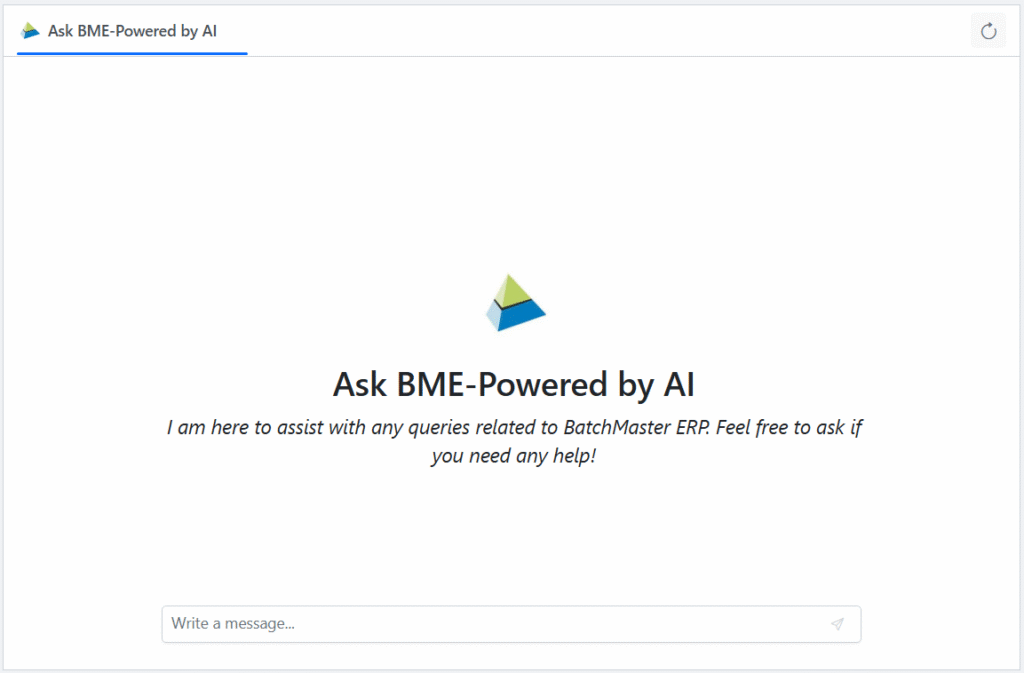
The AI-powered Ask BME Chatbot within the BatchMaster Web Application is now featured with a security enhancement to safeguard company data. To maintain secured usage of Chatbot, direct URL access (without login) is restricted outside the BatchMaster Web environment. This safety feature ensures that all the Chatbot interactions are authenticated and secured within the BatchMaster Web interface.
Accessibility to Ask BME Chatbot
- Access Blocked: Direct URL access to the Ask BME Chatbot via the bookmarks or external links is restricted. A warning message appears as shown below:

- Access Allowed: You can interact with AI-powered Chatbot “Ask BME” via the Ask BME
 option (Go To: BatchMaster Web Dashboard→ Ask BME ) within the BatchMaster Web Application interface after doing a successful login to the BatchMaster Web.

Upon clicking the Ask BME option on the BatchMaster Web dashboard, the system validates access to the Chatbot confirming that you are logged-in as BatchMaster Web authenticated user.
Implement Email functionality on Telerik Report
The Email Layout Master screen is now enhanced with Invoice, Quotation/Sales Requisition, and Other options provided under the Screen Name dropdown field. The Screen Name determines the exact document context for which the maintained email template should be used. This ensures that each document can have its own email template. The following three new options are now provided in the dropdown:
- Invoice option is now provided for maintaining the email template to be used for emailing generated invoice report.
- Quotation/Sales Requisition option is now provided for maintaining the email template used for sending Quotations or Sales Requisition reports.
- The Other option is now provided for maintaining general-purpose email template used whenever a document‑specific template is not available.
When you send purchase order or sales order reports using the Send an Email  option on the Telerik report interface, the system automatically fetch the recipient’s email address from the following screens.
- Vendor Information tab of the Vendor Master screen for Sales Orders.
- Customer Information tab of the Customer Master screen for Purchase Orders.
The system obtain the maintained template from the Email Layout Master screen.

BatchMaster Web now follow the sequence to fetch the email layout template as an enhanced mechanism for managing email communications. The system now follows a defined sequence to fetch the email layout template, ensuring that the correct sequence is consistently applied to outgoing emails. This sequence improvement serves clarity and predictability, and consistency in communication. When the mail is sent to the vendor/customer e-mail, the system retrieves the subject line and email body in the following sequence:
- User‑Level Layout for the selected report: Email layout configured specifically for the logged‑in user for that particular report. The user level email template is applicable for the specific user who has currently logged into BatchMaster WEB.
- Global‑Level Layout for the selected report: Email layout defined at the global level for that particular report. The global level email template is applicable for every user who logs into BatchMaster WEB.
- User‑Level Layout with Other option: Email layout configured for the logged‑in user where the Screen Name field is set to Other. The user level email template is applicable for the specific user who has currently logged into BatchMaster WEB.
- Global‑Level Layout with Other option: Email layout defined at the global level where the Screen Name field is set to Other. The global level email template is applicable for every user who logs into BatchMaster WEB.
Customization and UDF related enhancements
On the Custom Master Design screen, a new Price data type is now supported. With this numeric field type used to store monetary values. It is designed for entries that represent financial amounts such as cost, rate, fees, charges, or any value requiring decimals.

Production-Print MBR/BMR
In BatchMaster Web a new Print MBR/BMR Setup screen is now provided to set the printing defaults for the Batch Manufacturing Record (BMR) or Master Batch Record (MBR) product or item-wise to streamline and standardize the production process. Persistently maintained defaults on the Print MBR/BMR Setup screen help the system for searching and retrieving the required data. The system is also responsible for printing the BMR and MBR documents as per the product/item key for a time period.

BME and BMR are both documents that are crucial to ensure the manufacturing process stays consistent, including the traceability and authority over regulatory standards for industries like food, pharmaceuticals, and many others.
- A Batch Manufacturing Record (BMR) is an all-inclusive, real-time document that is produced during the manufacturing process and captures all the essential details and data about the product’s batch. Each BMR record is significant for compliance and quality in a wide range of industries.
- Master Batch Record (MBR) is a document that summarizes the detailed instructions for process manufacturing and serves as a production template.