

BMW 8.72.62
1. Index
| S. No. | Enhancements | Details |
| 1. | BatchMaster Web Login Process | Enhancement in Login Process – Mandatory to Change Password at First Login if 2FA Security is implemented. |
| 2. | Third Party Integration | · BatchMaster Web – Shopify Integration.
· BatchMaster Web – QuickBooks Integration. |
| 3. | NPD/SRM Module | · Introduced a new NPD/SRM module to the BatchMaster Web |
| 4. | R and D Module | Enhancements on the Physical Property Analysis Screen:
· Added Show/Hide Properties button available under the Line Items Tab to view/hide properties on grid. · On the property grid you can use Column Filter, Column Chooser, search character string within the grid by entering characters in the search textbox, and save the displayed grid by clicking the Save Grid Settings button. Enhancement on the Boilerplate Instruction Screen: · A new Allow Recurring Inspection checkbox is introduced at the Boilerplate Type field of the Boilerplate Instruction Screen. |
| 5. | Production Module | BatchMaster Web Enhanced with Lot Strength Functionality:
· The lot strength calculation is applicable on both Batch Ticket and Batch Close Screens. Enhancements on the Batch Ticket Screen: · A new special function Downtime Entry for Processcell is added on the Batch Ticket Screen. A new special function, Item Label Report, to print the labels for the end item(s) of the batch. |
| 6. | CRM Module | Enhancements in CRM Module:
· Introduced a new CRM module to the BatchMaster Web. · A new screen Transfer Approved Samples Screen. |
| 7. | General Ledger Module | Enhancement in General Ledger Module:
· A new Budget Dashboard. |
| 8. | WMS Outbound Module | Enhancement on the PO Receipt Screen:
The Item Key field at the PO Receipt Screen is now enhanced to Item Key/GS1 field. |
| 9. | MPS/MRP Module | Enhancements on MRP and MPS Dashboard:
· Enhanced MPS and MRP dashboard’s usability leads to a more user-centric design, Enhancements on MRP Dashboard: · Added Item Key, Available Qty, and Qty On Hand at MRP Run labels. · Added Split Order, Transfer Purchase Order, and Delete action options available under the Planned Prod./Purch Order tab. Enhancements on MPS Dashboard: · Added Item Key, Available Qty, and Qty On Hand at MRP Run labels. · Added Split Order, Transfer Production Order, and Delete action options available under the Planned Prod./Purch Order tab. Enhancements on Run MPS and Run MRP Screens: · Added a note Preferred in Full Range on both the screens. A new Forecast Export-Import Screen. |
| 10. | Pallet Ti-Hi Logic | Now, BatchMaster Web supports Pallet Ti-Hi logic. The system performs same check while processing the following transactions:
• Purchase Order Receipt. • Transaction Entry for A, P, and C types of transactions. |
| 11. | Item Key field enhancement on various BatchMaster Web screens | The Item Key field is enhanced to Item Key/GS1 field on the following screens:
· PO Receipt · EBT · RM Issue · FG Receipt · Purchase Return · Sales Return · Shipment · Pallet Master · Inventory Adjustment · Spot Count · Pallet Count · Putaway · Production Picking · Production Staging, and · Material Return |
| 12. | QC Module | Enhancement on the CAPA screen:
While adding the related NCs, you can view the CAPA number attached to the NCs. The NCNo lookup screen is enhanced with the CAPANumber field. |
| 13. | BOM Module | Enhancement on the BOM Explosion screen:
· Added a Detect Loop button. |
| 14. | Common Module | · A new Audit History Dashboard. |
| 15. | Sales Module | Enhancement on the Customer Master Screen:
· The Credit Card Number field now stores the entered card number in an encrypted format to ensure PCI compliance. |
| 16. | Inquiry and Reports Module | Enhancements on the Pallet Label Report:
The Process button on the Pallet Label Screen is now replaced with two new Pallet Report and Pallet Manifest buttons for printing pallet labels in distinct formats. |
| 17. | Purchase Module | Enhancements on the Purchase Order Receipt Screen:
· Added Item Label Report special function for printing the item labels of end items. Enhancements on the Item Label screen: · Added Item Label, Purchase Receipt, Shipment, and Production options under the Document Type field for printing labels. · New Item Specifications PO report. |
| 18. | Inventory Module | Enhancements on the Item Master screen:
· Added Material Property, QC Item Test, and Maintain Item Location special functions. · Upon processing Process/Cancel Physical Counting Orders the system generates an alert in FYI Alerts. |
| 19. | Quality Control Module | Enhancements on Quality Control Module:
· New CAPA screen. New Non Conformance screen. |
| 20. | Enhancement on Production Staging & Picking | · Direct scanning of LPNs having Single Lot while performing production picking and staging operations. |
| 21. | Customization Module | · New Custom Web Page screen.
· Capability to create hierarchical grid with drill-down custom screens. |
| 22. | Enhancements | Enhancements in Setup Module:
· Changed Prepaid Expense Setup Screen name to Revenue and Expense Recognition Screen. · New NPD/CRM Setup Screen. · The NPD/CRM Setup Screen is enhanced with a new Sample Approver Group field located at the CRM Tab. · A checkbox Consider Hold Purchase Order is added on the MPS Setup Screen. · The Email Layout Master Screen enhanced with formatting options for creating default email templates that are sent to customers and vendors. Enhancements on the Module Setup Screen: · Added various fields located under the Report Setup section – WMS Setup option. · Added an API Key field located under the USDA API KEY section – Inventory Setup option. Enhancement on the Module Setup Screen: · Added a new field US Tax Implementation, i.e., is located under the US Tax Defaults section of the Common Setup option. Enhancement on the Box Master Screen: Added a new Box Type field. |
SDS Module
Introduced a new SDS Module in BatchMaster Web
A new SDS module is introduced in the BatchMaster Web. The SDS Module is for supporting legacy customers who are migrating from BatchMaster Enterprise (Desktop Version) to BatchMaster Web. New BatchMaster Web customers use Lisam Integration to meet their SDS requirements.
Industries implement safety rules and regulations enforced by governments using the SDS (Material Safety Data Sheet). An SDS contains accurate information on reportable materials contained in products so that they can handle materials safely. The information on reportable materials may include their physical properties, safe handling and storage procedures, hazardous material ratings, first aid to be done in case of any hazard, and occupational exposure limits. Such information is provided to consumers at the time of shipment by means of labels on containers, material safety data sheets, or training programs. BatchMaster Web automatically generates SDSs in full compliance with the OSHA Hazard Communication Standard, SARA Title III, ANSI, and other similar government reporting requirements.

R and D Module
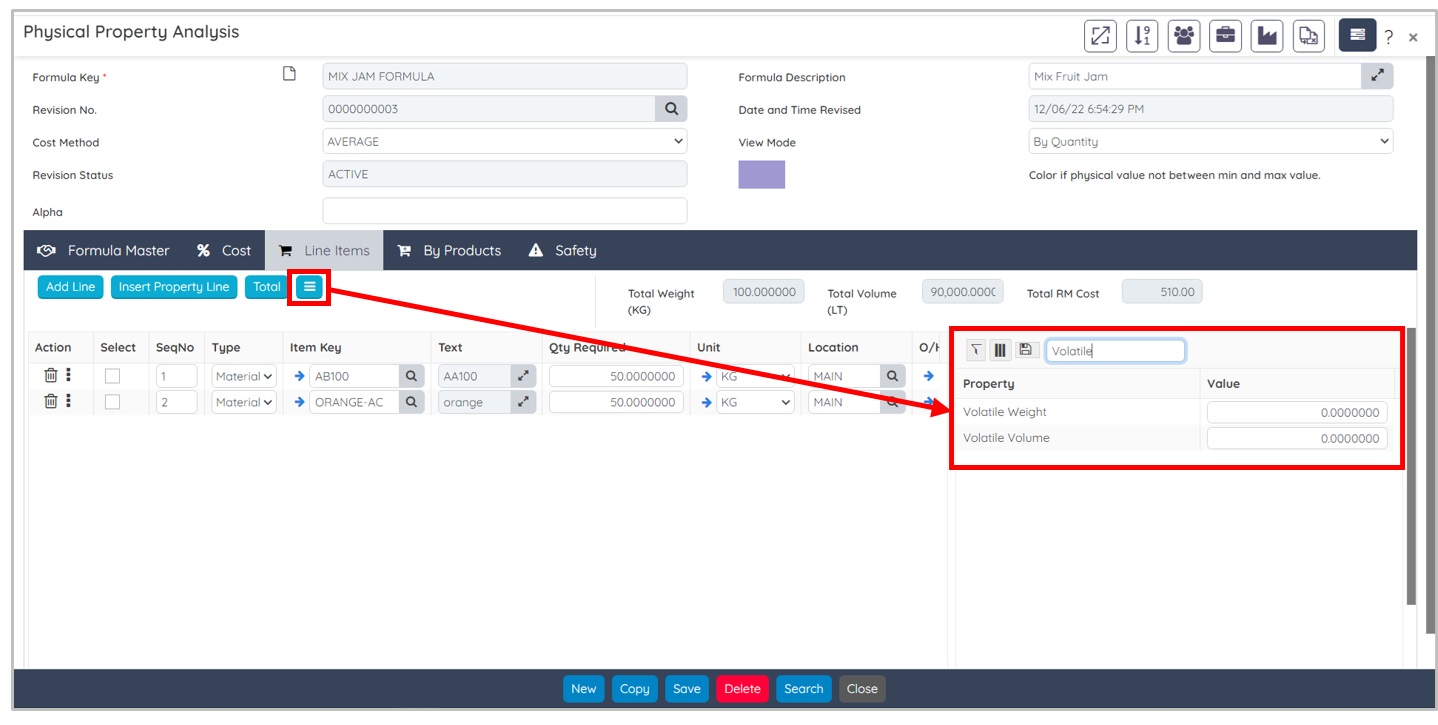
Enhancements on the Physical Property Analysis Screen
The Physical Property Analysis screen is now enhanced with a Show/Hide Properties button available under the Line Items Tab to view/hide properties on grid. On the property grid you can use Column Filter , Column Chooser , search character string within the grid by entering characters in the search textbox, and save the displayed grid by clicking the Save Grid Settings button.
BatchMaster Web Login Process
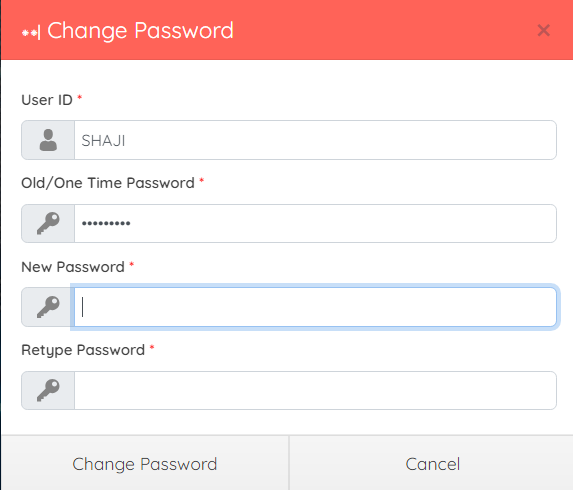
Enhancement in Login Process – Mandatory to Change Password at First Login if 2FA Security is Implemented
You can proceed to sign in to BatchMaster Web account with the provided credentials and system generated OTP if 2FA security is implemented. It is a security process in which users provide two different authentication factors to verify account login. 2FA improves users account security by providing an extra layer of security while login to the application and ascertains the application users are who they say they are. Now it is mandatory to change the login password at first time when you login to the BatchMaster Web application, if 2FA security is implemented.
BatchMaster Web – Shopify Integration
Now BatchMaster Web can be integrated with the Shopify e-commerce platform. BatchMaster Web-Shopify integration is for linking and syncing BatchMaster Web with Shopify to create a simplified experience for catching, tracing, and examining real-time data to and from BatchMaster Web-Shopify applications.
Configuration Module
Enhancements on the Module Setup Screen
BatchMaster Web now implements US Tax functionality within the system to streamline tax-related processes, improve accuracy, ensure compliance, and contributes to overall operational efficiency and cost savings for businesses operating within the United States. The Module Setup screen is now enhanced with a new field US Tax Implementation, i.e., is located under the US Tax Defaults section of the Common Setup option.
US tax is commonly referred to as the tax regime applicable to the United States. US taxes are imposed zip-code-wise. The total rate, state tax rate, city tax rate, county tax rate, and additional tax rate may differ for different zip codes. The zip details URL and zip tax URL are unique for each zip code.

Sales Module
Enhancements on the Box Master Screen
The Box Master screen is now enhanced with a Box Type field that lets you define the box type in which you wish to pack the item(s) that fulfill the sales picking workflow. The available options in the Box Type field are:
- BOX option is provided for packaging the product.
- LPN (License Plate Number) option is provided for packaging purpose of the product.
- LT LPN option is provided for larger than pallet ID that fulfill packaging purposes of the product.

Setup Module
Changed Prepaid Expense Setup Screen Name
To conform accounting standards, the BatchMaster Web Prepaid Expense Setup screen is now called Revenue and Expense Recognition. This facilitates informed decision-making and fosters trust and confidence among stakeholders.

BatchMaster Web – QuickBooks Integration
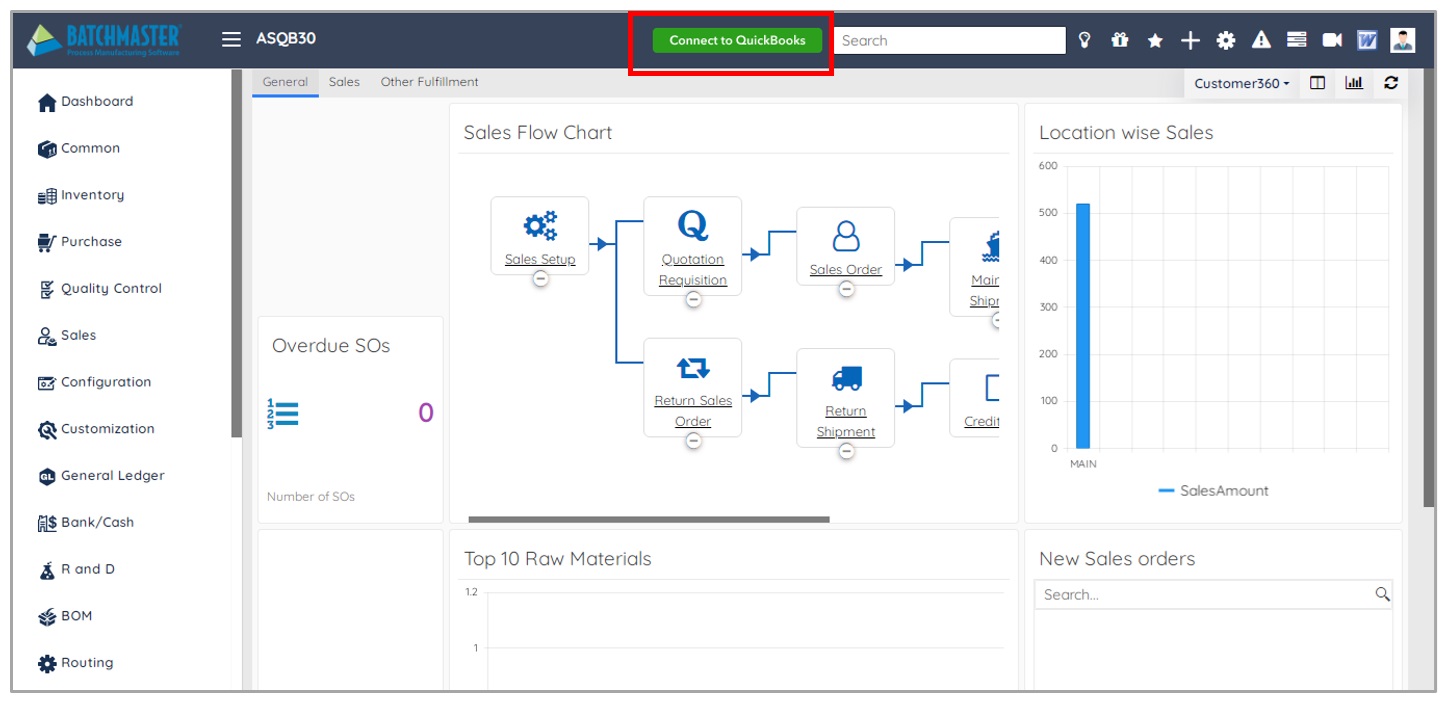
Now BatchMaster Web can be integrated with the QuickBooks. BatchMaster QuickBooks integration is for linking and syncing BatchMaster Web with QuickBooks to create a simplified experience for catching, tracing, and examining real-time data to and from BatchMaster Web-QuickBooks applications. To connect QuickBooks Online, a new Connect to QuickBooks button is provided on the BatchMaster Web dashboard.
The QuickBooks Online integration (Oauth2.0) offers you a simple and easy platform to manage your business finances. It is a secure tool which allows you to transfer information like Customer, Vendor, and Account etc. between the BatchMaster Web and QuickBooks Online. You will be able to upload / download information to and from the BatchMaster Web and QuickBooks Online, complete with Shipping and Billing information, Customer details, Vendor details etc. You will also be able to upload AP, AR and GL to QuickBooks finance
Production Module
BatchMaster Web Enhanced with Lot Strength Functionality
Now, BatchMaster Web supports Lot Strength functionality. The term Lot Strength refers to the percentage of an active ingredient in an item present in a specific lot of that item. For example, fat is the active ingredient in milk. A lot strength of 60% for a specific milk lot indicates that it contains 60% fat.
To help explain how BatchMaster Web assures correct lot strength, consider the following example:
Your finished product is a mango milkshake. To produce 1,000 liters of product, your formula requires 200 liters of milk with 80% lot strength. To produce the milkshake, you issue milk from three different lots from inventory: the first lot with 80% lot strength, the second lot with 70% lot strength, and the third lot with 100% lot strength.
Based on information entered with the procedure below, the system will calculate:
- How many liters of milk should be drawn from each lot to obtain 200 liters at 80% lot strength?
- How much of a solvent or filler item should be mixed with these milk lots to produce 1,000 liters of mango milkshake.
- The Lot Strength Calculation is applicable on both Batch Ticket and Batch Close screens.

CRM Module
Transfer Approved Samples Screen
A new Transfer Approved Samples screen is introduced in the CRM module. The Transfer Approved Samples screen lists the approved sample records that are created via the Sales Opportunity Transaction screen. Once the sample records are transferred, they are visible on the Sales Opportunity Transaction screen under the Product Range tab Samples special function. This indicates that the approved sample is sent to the customer, lead, or prospect for feedback purposes. So that the sales team can proceed with the sales process workflow accordingly.

NPD/SRM Module
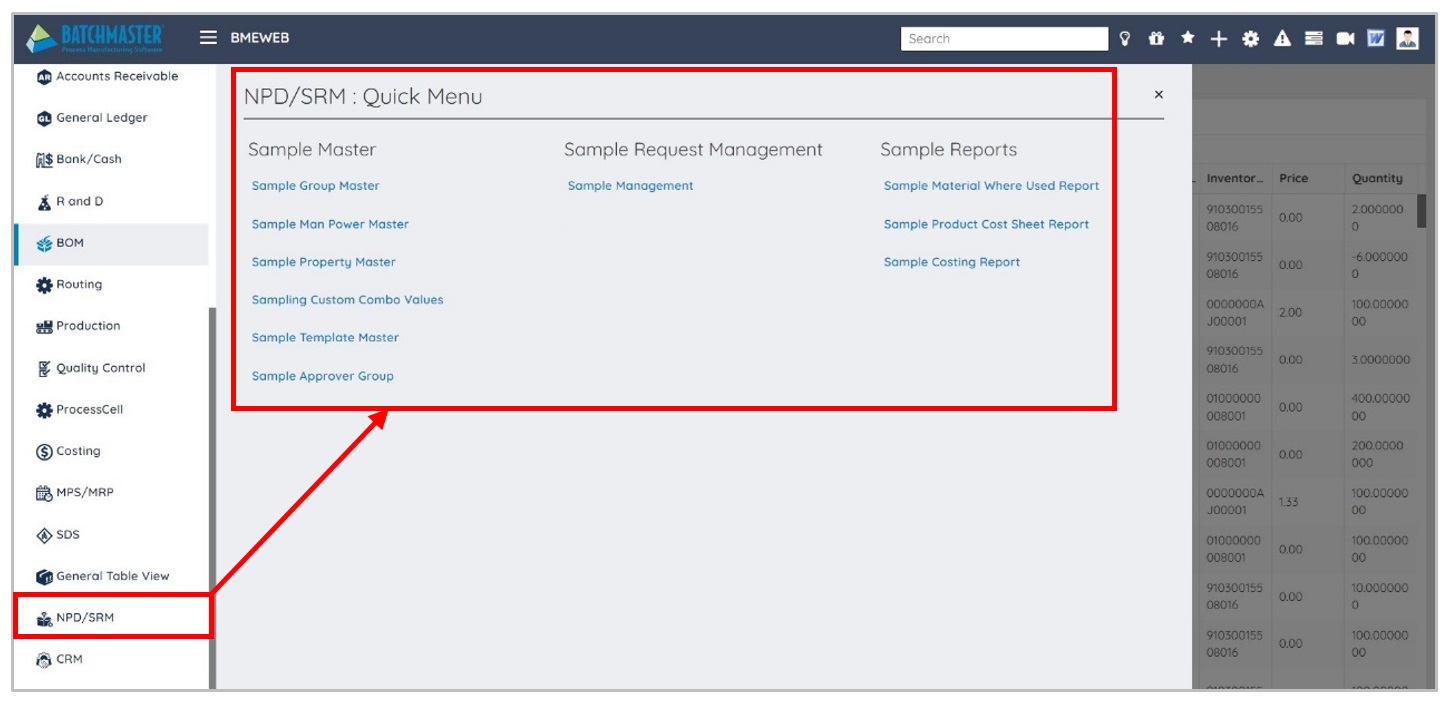
A new NPD/SRM module is introduced in BatchMaster Web. Sample Request Management (SRM) keeps complete track of all information exchanged with a customer. It provides a secure mechanism to maintain communication between departments and concerned personnel. Put in place a full-proof approval procedure to approve the sample and send it to the customer. Using it, you can:
- Capture a customer request.
- Perform a cost analysis.
- Do R&D on the samples to meet the customer’s needs.
- Develop samples considering the customer-defined specifications. On approval, develop the actual product.
General Ledger Module
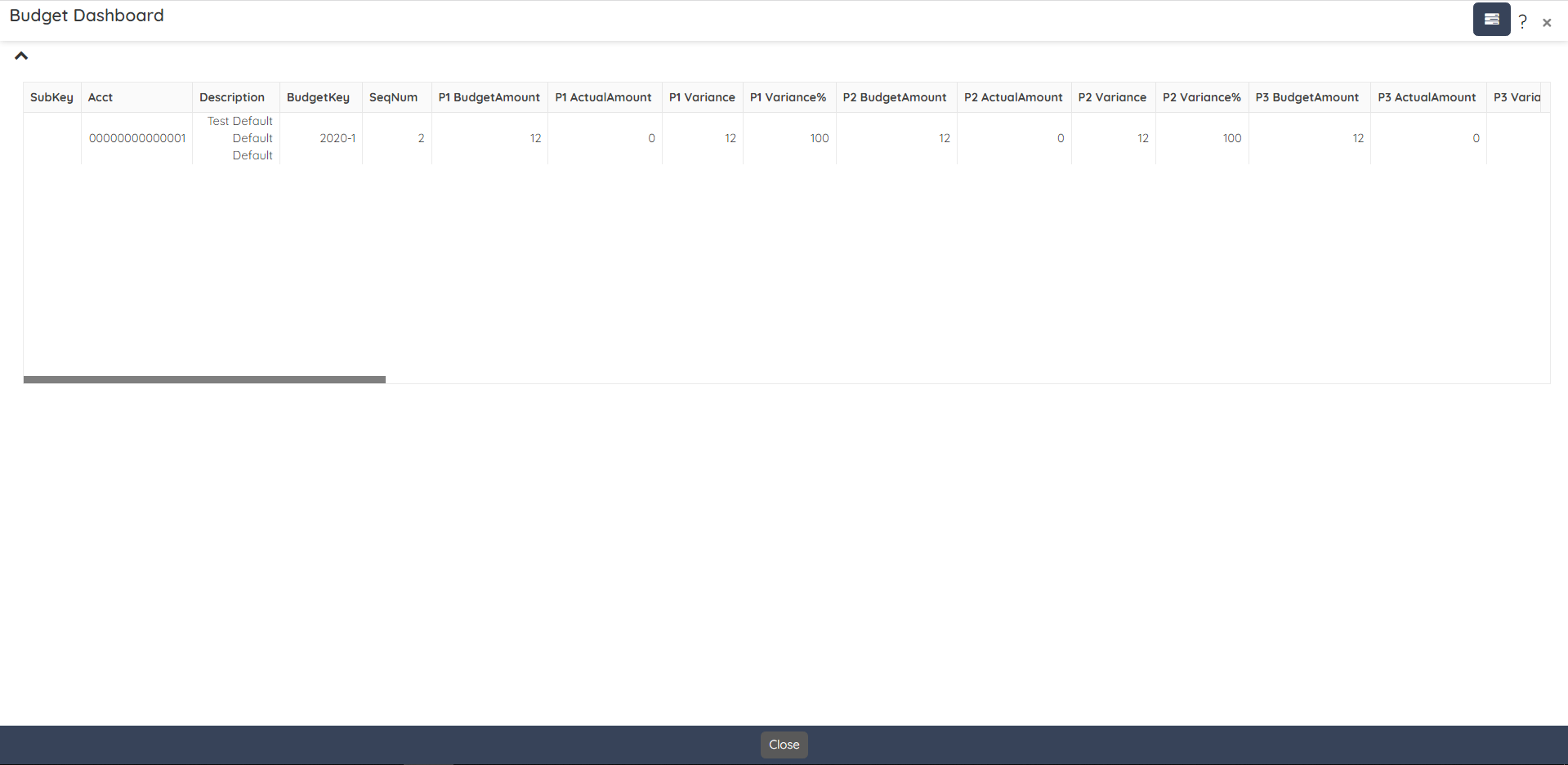
Budget Dashboard
A new Budget Dashboard is introduced in the CRM module. The Budget Dashboard lets you view budget data that will be filtered and displayed according to the specified filter criteria.

This dashboard is provided to view the actual values against the budgeted values with their respective variances and variance percentages. The data is displayed on the dashboard for selected periods.
Outbound Module
Enhancement on the PO Receipt Screen

The same functionality is also available on the following screens:
- Pallet Master
- Spot Count
- Pallet Count
- Putaway
- Production Picking
- Production Staging
- Material Return
- Inventory Adjustment
CRM Module
Introduced a new module in BatchMaster Web
A new CRM module is introduced in BatchMaster Web. Sample Customer Relationship Management (CRM) is the process of creating and maintaining relationships with business customers or consumers. It helps businesses to gain insight into the behavior of their customers and modify their business operations to ensure that customers are served in the best possible way. CRM lets your sales and customer support reps work smarter. It helps you collect and organize information about your customers and lets you analyze the data for future opportunities.

Setup Module
NPD/CRM Setup Screen
A new NPD/CRM Setup screen is introduced in the Setup module. Setting up NPD (New Product Development) and CRM (Customer Relationship Management) structures in BatchMaster Web is crucial for businesses looking to efficiently develop and launch new products while effectively managing and nurturing customer relationships. Both NPD and CRM are ongoing processes that require regular evaluation and adjustment to meet changing business needs and customer expectations. Integrating these systems can help you develop products that align better with customer preferences and improve overall customer satisfaction. With this NPD/CRM Setup screen, you can set the defaults. Using the NPD/CRM Setup screen, you can:
- Establish the last-used transaction number for the sample request and sales opportunity.
- Set the default cost method for a sample request.
- Set the default price list for the inventory items of the new sample.
- Specify approvers for the sales, NPD (New Product Development), or sample.

Configuration Module
Module Setup Screen Enhancements
The Module Setup screen is now enhanced with various fields located under the Report Setup section – WMS Setup option. Using the added fields, you can:
- Select the desired option to generate the WMS Report.
- Set the default value for the Of Label field as it appears on the following screens:
- PO Receipt
- Sales Return
- SO Pick Lot List
- Print BOL
- COA Reports
- Packing Slip
- Shipping Label Report
- Item Label
- Bin Label
- Pallet Label
- QC Label
- Receipt Report

Setup Module
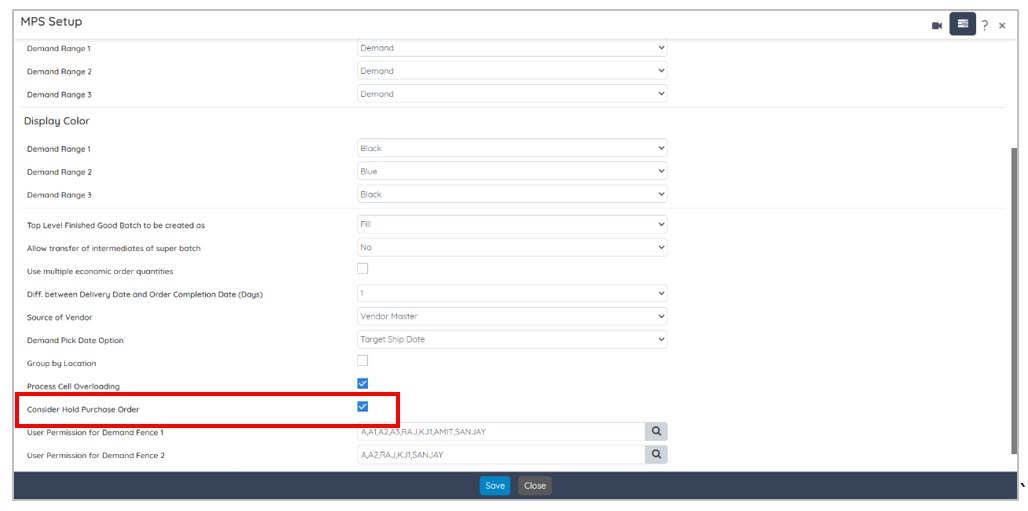
MPS Setup Screen
The MPS Setup screen is now enhanced with a checkbox Consider Hold Purchase Order. You can mark this checkbox if you want the system to consider a supply-from-hold status purchase order.
MPS/MRP Module
MRP and MPS Dashboard Enhancements
Disable/Enable Header Action options of Confirm/Firm Planned as per Allow Transfer of grid is Y/N. In summary, enhanced MPS and MRP dashboard’s usability leads to a more user-centric design, fostering better user experiences, increased productivity, and overall satisfaction.
Enhancements on the MRP Dashboard Screen
The MRP Dashboard is now enhanced with the Item Key, Available Qty, and Qty On Hand at MRP Run labels.

The MRP Dashboard is now enhanced with the Split Order , Transfer Purchase Order , and Delete action options available under the Planned Prod./Purch Order tab.

Enhancements on the MPS Dashboard Screen
The MPS Dashboard is now enhanced with the Item Key, Available Qty, and Qty On Hand at MRP Run labels.

- The MPS Dashboard is now enhanced with the Split Order , Transfer Production Order , and Delete action options available under the Planned Prod./Purch Order

Enhancements on the Run MPS and Run MRP Screens
The Run MPS screen user interface is now enhanced with a new note, as shown below:

On processing Run MPS, the system displays a message as shown below:

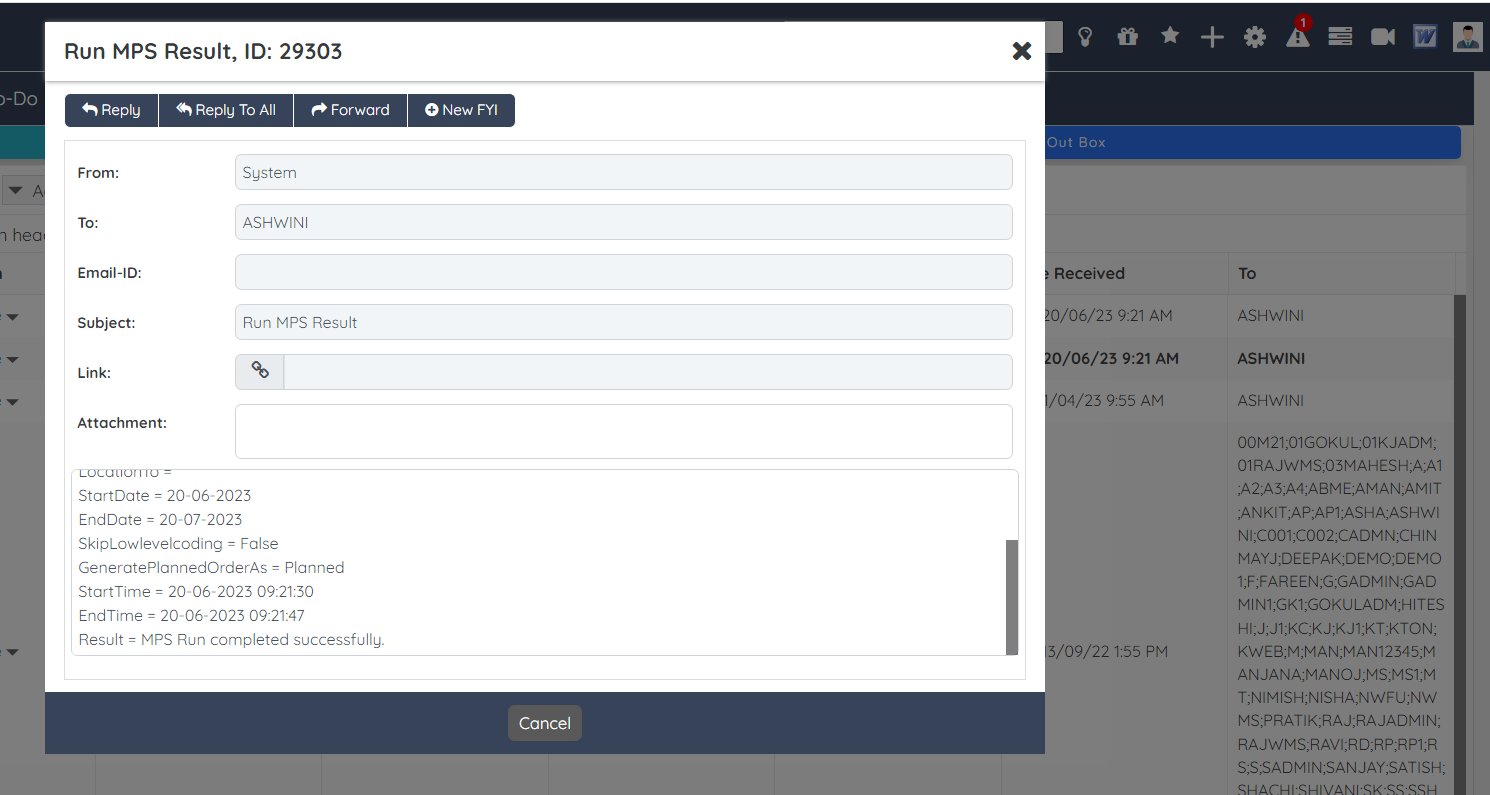
The processed MPS result is visible under the Alerts option.

Click the FYI alert record to view the run MPS result.
A similar enhancement is applicable to the Run MRP screen as well.
Setup Module
Enhancement on the NPD/CRM Setup Screen
The NPD/CRM Setup screen is now enhanced with a new Sample Approver Group field located at the CRM Tab. In the Sample Approver Group field, you can select single or multiple NPD approvers (New Product Development Users) who are authorized to approve the sample request via the Approver Role Center.

The authorized approvers can approve sampling records via the Approver Role Center screen – Sales Opportunity Sampling option.

Pallet Ti-Hi Logic
Now, BatchMaster Web supports Pallet Ti-Hi logic. This logic is added to BatchMaster Web for streamlining warehouse operations that include receiving an inventory, storing, picking, packing, and thereafter performing its shipping. After receiving inventory in a warehouse, its management personnel usually perform warehouse operations via the pallets on which the containers are placed. Generic form of a unit load is pallet, which is used for transportation of containers. A container consists of containerized items packed within boxes or cartons. Single or multiple containers can be put on a pallet. The containers are placed on pallets that are moved via handling equipment such as forklifts or conveyors for transporting to a suitable location within a warehouse. The location within a warehouse where the containers are parked is a storage space that is termed as rack.
Say warehouse management personnel try to put a container on an available rack within the warehouse. The warehouse operation process gets complicated if the container dimensions are large enough as compared to the rack where the containers are going to be placed in a warehouse. To overcome this situation, container-carrying vehicles need to dump some of the exceeding containers at the source location, resulting in unintended multiple trips within the warehouse.
Pallet Ti-Hi is a concept that describe how containers are stacked on a pallet. It denotes the way of arranging containers in a warehouse by m
aximizing space utilization with stable and safe movement. Ti stands for Tier, and Hi stands for the Height. Ti and Hi together represent the number of layers (tiers) and containers in each tier, respectively. Overall, the Ti Hi concept is crucial for warehouse and logistics management as it offers a practical and cost-effective solution to optimize storage space, reduce operational costs, and enhance overall supply chain efficiency.
Once all the pallet related information is provided on the screen choose containers from the desired item lot(s). Selecting any number of containers from a single or multiple lots is permitted. However, the system now considers the TI Hi values specified for the pallet. i.e., the defined values at the Module Setup screen are:
Ti = 2 and Hi = 3.
Total containers = Ti*Hi = 2*3 = 6

On selecting the container exceeding the calculated Ti Hi dimension system refrains you to do so. Eventually, will display a warning message.

The system performs same check while processing the following transactions:
- Purchase Order Receipt
- Transaction Entry for A, P, and C types of transactions.
Item Key field Enhancement on Various Screens
In BatchMaster Web, Item Key field is now enhanced as Item Key/GS1 field on various screens. Using this field, you can enter or scan the unique identification key of the item. In the Item Key/GS1 field, you can also specify the number of characters to be considered in a barcode for the GS-1 code. The field length supports 14 + characters. For QR Code functionality, you need to define the GTIN number on the Item Master screen of the BatchMaster Web application. If the entered GS-1 code matches an existing item, the system obtains its associated details. The Item Key field is enhanced to Item Key/GS1 field on the following screens:
- PO Receipt
- EBT
- RM Issue
- FG Receipt
- Purchase Return
- Sales Return
- Shipment
- Pallet Master
- Inventory Adjustment
- Spot Count
- Pallet Count
- Putaway
- Production Picking
- Production Staging, and
- Material Return

Setup Module
Enhancement on the Email Layout Master Screen
The Email Layout Master screen is now enhanced with various formatting options for creating default email templates that are sent to customers and vendors regarding sales orders, invoices, quotations, purchase requests, purchase orders, or vouchers.

Production Module
Enhancement on the Batch Ticket Screen
The Batch Ticket screen is now enhanced with a new special function Downtime Entry for Processcell.

The Downtime Entry for Processcell special function is for defining the downtime of your production batch. Using the Downtime Entry for Processcell screen, you can maintain process cell-wise downtime information for a batch with appropriate Equipment ID, Downtime Category, Downtime Reason, Downtime Duration and related comments.

QC Module
Enhancement on the CAPA Screen
On the CAPA screen, while adding the related NCs, you can view the CAPA number attached to the NCs. The NCNo lookup screen is enhanced with the CAPANumber field as shown below:

Configuration Module
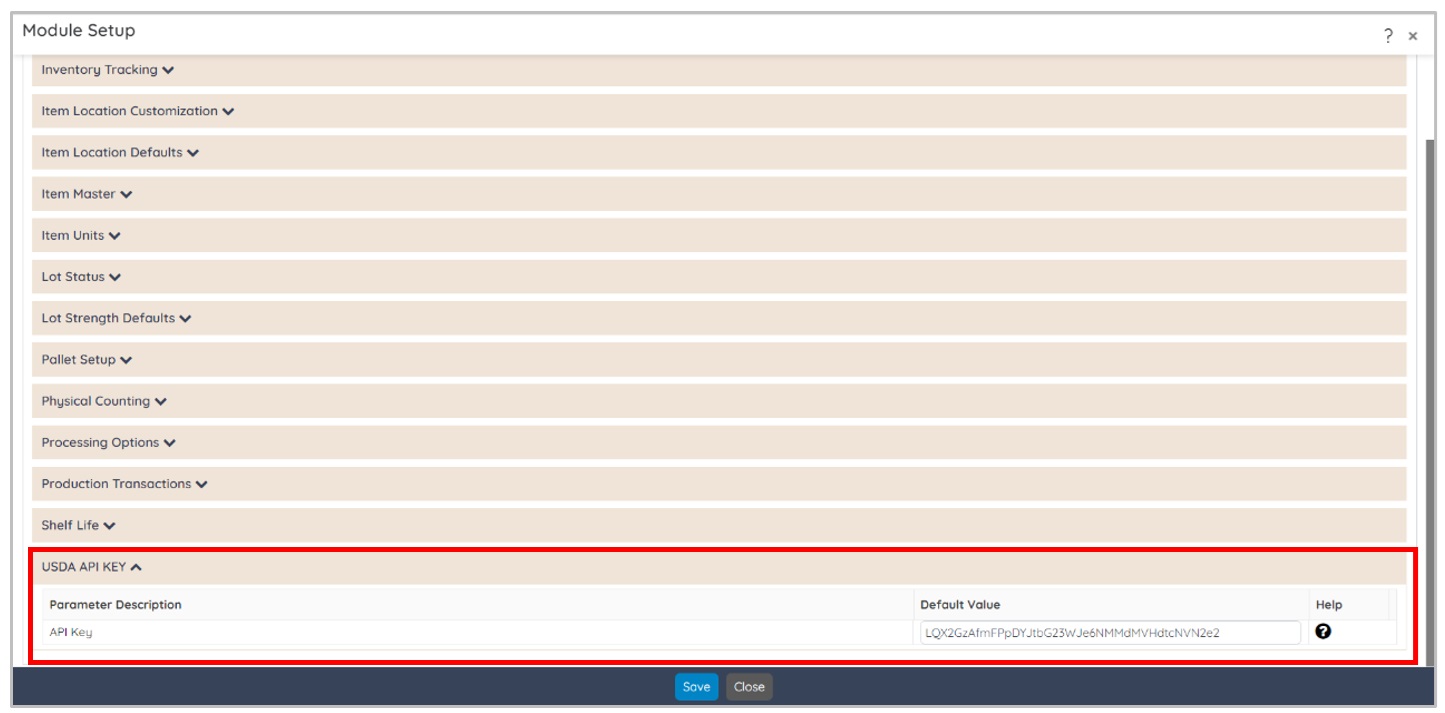
Enhancements on the Module Setup Screen
The Module Setup screen is now enhanced with an API Key field located under the USDA API KEY section – Inventory Setup option. Using the added API Key field, you can specify the USDA API Key as generated from the USDA official website. The USDA (United States Department of Agriculture) provided APIs (Application Programming Interfaces), also known as API tokens or access key, to access various data and services related to agriculture, nutrition, and food. The purpose of an API Key field is to authenticate and authorize BatchMaster Web to access USDA data and services for processing and printing nutritional labeling reports.
Administration Module
Enhancement on the Windows Service Configuration Screen
The Windows Service Configuration screen is now enhanced with a new Rec User ID field for specifying the name of the BatchMaster Web user who can modify the service.

BOM Module
Enhancement on the BOM Explosion Screen
The BOM Explosion screen is now enhanced with a Detect Loop button.

Using the Detect Loop button you can view all those item(s) that are having loop in their BOM hierarchy. BatchMaster Web considers a loop in the BOM hierarchy where the raw material is the same as the finished goods.

Common Module
Audit History Dashboard
A new Audit History Dashboard is introduced in the Common module. The Audit History Dashboard lets you view a quick view of activities performed during the signing process. You can view information about E-Signature transactions, including when and by whom an E-Signature screen is accessed and the reason for changes entered.

Sales Module
Enhancement on the Customer Master Screen
The Customer Master screen is enhanced with an encrypted Credit Card Number field available on the Process Information tab. The Credit Card Number field stores the entered card number in an encrypted format which is used by the customers. In order to ensure PCI (Payment Card Industry – Data Security Standard) compliance, after saving the record, the entered credit card number is displayed in an encrypted format. The length of this field will be according to finance integration, and the maximum permissible length of this field is 20 alphanumeric characters.

When you create a new prospect record, this field remains disabled.

Enter credit card number in the popup window after clicking the Enter Card No. button.

The system defaults the entered credit card number to the Credit Card Number field. Once the record is saved, the entered credit card number gets displayed in an encrypted format by hiding first 12 number of the credit card.

MPS/MRP Module
Forecast Export-Import Screen
A new Forecast Export-Import screen is introduced in the MPS/MRP module.

Using the Forecast Export-Import screen, you can generate the forecast template into an Excel Sheet.

Moreover, you can import the updated forecast template to the BatchMaster Web database. With forecast import, the existing records will be updated while the new ones are automatically created.
Inquiry and Reports Module
Enhancements on the Pallet Label Report
The Process button on the Pallet Label screen is now replaced with two new Pallet Report and Pallet Manifest buttons for printing pallet labels in two distinct formats.
- Tapping the Pallet Report button lets you print the pallet labels in a generic format.
- Tapping the Pallet Manifest button lets you print the pallet labels with various inventory-associated details including the barcode. The printed barcode on the pallet label facilitates the tracking of an inventory within the warehouse by scanning the printed barcode.

Similar enhancement is applicable on the Pallet Inquiry screen.
Purchase Module
Enhancements on the Purchase Order Receipt Screen
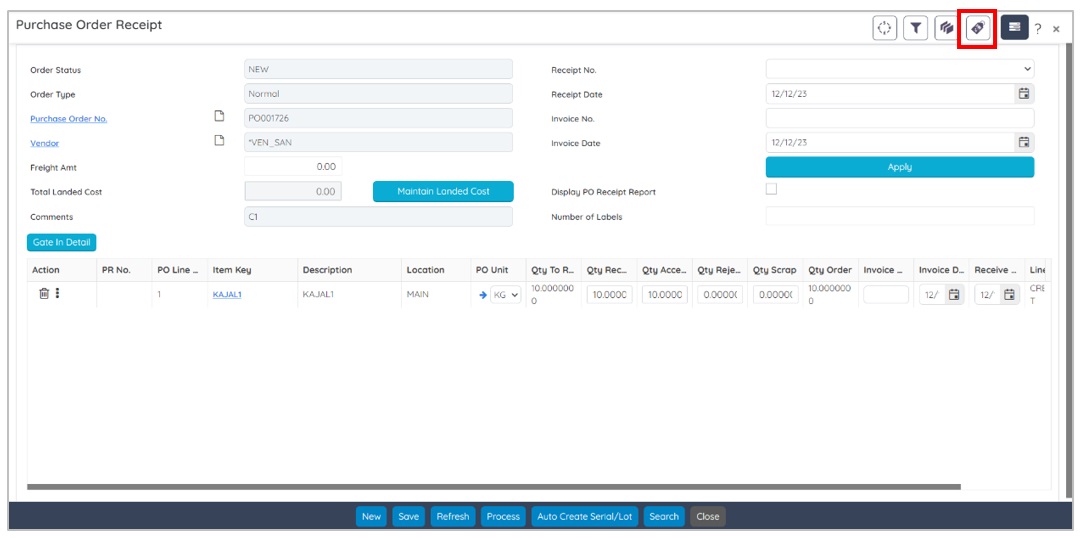
Purchase Order Receipt screen is enhanced with a special function Item Label Report for printing the Item Label Report. The Item Label Report lets you print the labels for the purchase order receipt items. The generated report displays details like Item, Location, Expiration, Lot Number, Originating Doc#, Receiving Date, V. Lot#, and Vendor ID.
Purchase Module
Enhancements on the Item Label Screen
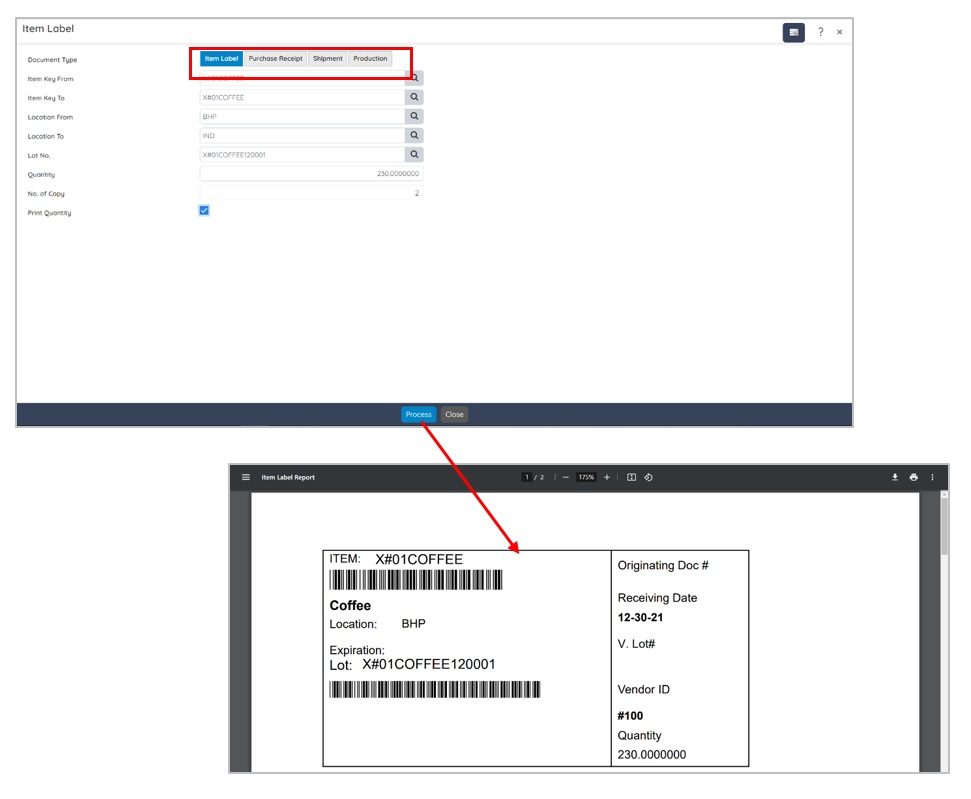
The Item Label Report screen is enhanced with Item Label, Purchase Receipt, Shipment, and Production options under the Document Type field for printing the selected item range, purchase receipt, shipment, and production batches. The generated label displays the details like: Item Key, Item Description, Location, Expiration Date, Lot Number, Originating Document Number, Receiving Date, Vendor Lot Number, and Vendor ID.
Inventory Module
Enhancements on the Item Master Screen
The Item Master screen is now enhanced with Material Property, QC Item Test, and Maintain Item Location special functions.

- The Material Property special function allows you to specify/edit the values for the various physical properties of an item at the Material Property screen when required.
- The QC Item Test special function allows you to associate the item with the required QC test(s) or modify the Item associated QC test(s) at the Item Test Master screen when required.
- The Maintain Item Location special function allows you to maintain items at several locations via the Item Location screen when required.
Production Module
Enhancement on Batch Ticket Screen
The Batch Ticket screen is enhanced with a new special function, Item Label Report, to print the labels for the end item(s) of the batch. BatchMaster Web generates the Item Label Report as per the option specified under the Display Report section of the Profile option available on the initial page after you login to the BatchMaster Web application.

Similar enhancement is applicable on the following screens:
- Batch Close
- Item Label Report
- Purchase Order Receipt
- PO Receipt
Quality Control Module
CAPA Screen
A new CAPA screen is introduced under the Quality Control module of the BatchMaster WEB. Using the CAPA screen, you can record all details about business situations that warrant a permanent record for future reference.

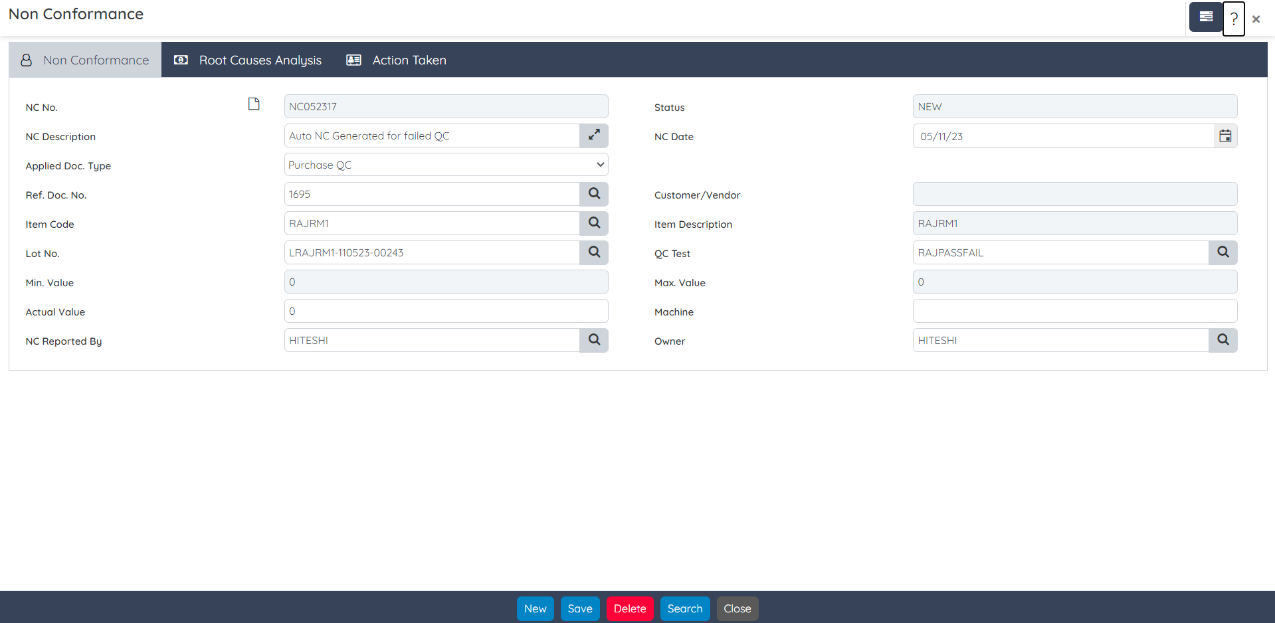
Non Conformance Screen
A new Non Conformance screen is introduced under the Quality Control module of the BatchMaster WEB. Using the Non Conformance screen, you can record discrepancies or manually enter customer/vendor complaints.
R and D Module
Enhancement on the Boilerplate Instruction screen
BatchMaster Web now implements recurring inspection-type boil
erplates. Businesses might require defining the specific parameters, checklists, and frequencies tailored to their needs. Regular review and updates to the boilerplate based on feedback and evolving requirements are also essential to its effectiveness.
For the adoption of such a standardized approach, BatchMaster Web offers recurring inspection-type boilerplates that significantly contribute to operational efficiency, regulatory compliance, and the overall quality and safety of a business’s operations.
In BatchMaster WEB, a new Allow Recurring Inspection checkbox is introduced at the Boilerplate Type field of the Boilerplate Instruction screen. The Allow Recurring Inspection checkbox appears when you select the Inspection option in the Inspection Type field. Selecting the Inspection option enables you to attach an Inspection details with the boilerplate.

If Allow Recurring Inspection checkbox is marked, the system allows recurring transactions on the EBT screen. Say, for example, measuring temperature is required to be recorded at regular intervals.
Enhancement on Production Staging & Picking
In BatchMaster Web you can now directly scan the LPNs having Single Lot while performing production picking and staging operations. The direct scanning of LPNs associated with a single lot enhances accuracy, efficiency, traceability, and compliance within warehouse management processes, contributing to improved overall operations and customer satisfaction.

Purchase Module
Item Specifications PO screen
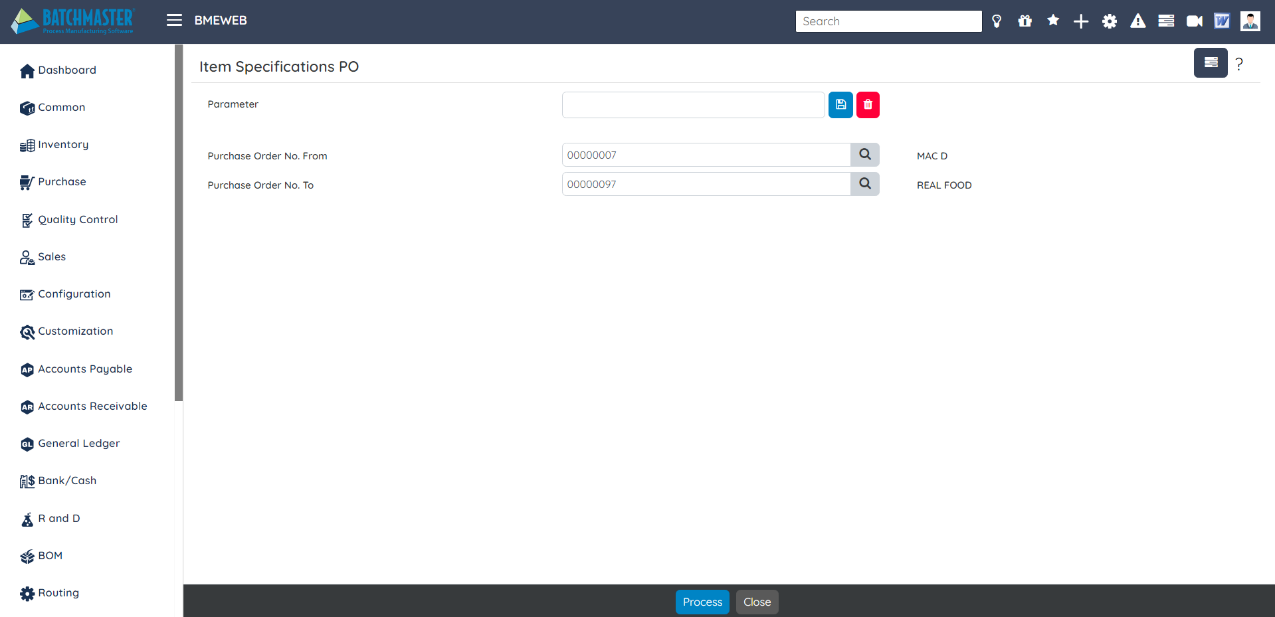
A new Item Specifications PO report is introduced in the Purchase module. Using this report you can view details about the items included in a purchase order. It ensures that both the buyer and the supplier have a clear understanding of the items being ordered and their associated specification details. This report serves as a reference document throughout the procurement process.
Customization Module
Custom Web Page Screen
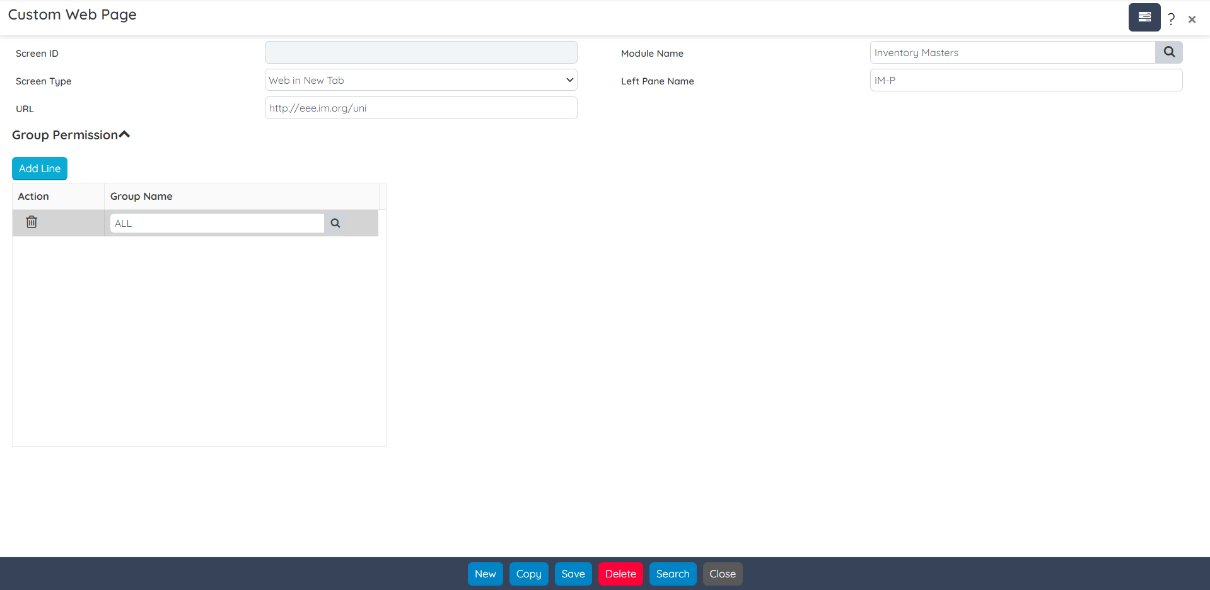
A new Custom Web Page screen is introduced in the Customization module. Using this screen you can add a particular web page that provides features or functionalities that aren’t available in the standard ERP modules, but are specific to your organization’s needs.
Hierarchical Grid and Drilldown
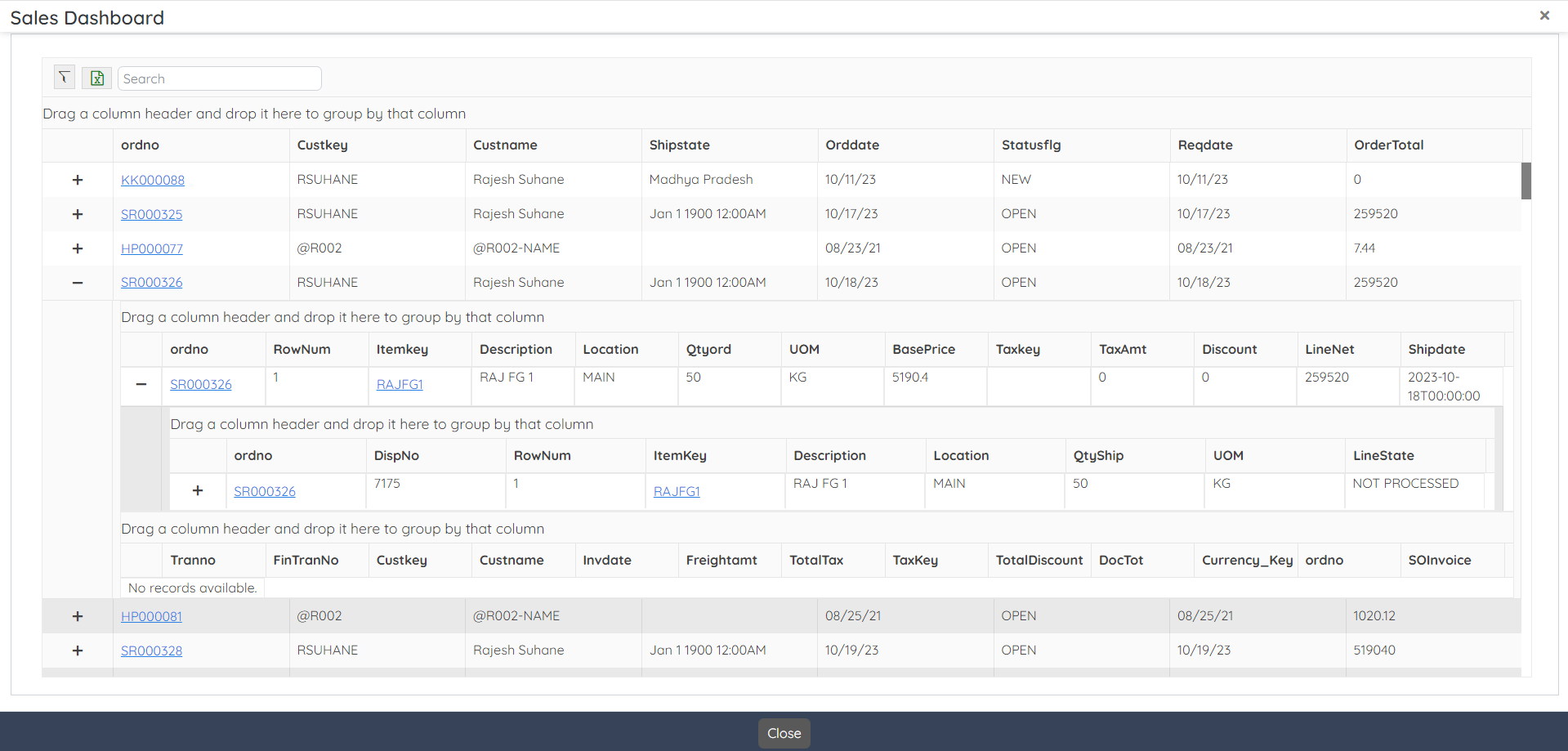
BatchMaster Web offers the capability to create hierarchical grid with drill-down custom screens and widgets. It provides a powerful means to analyze, comprehend, and utilize complex data structures effectively, leading to more informed decisions and streamlined processes within a business.


Inventory Module
Enhancements on the Process/Cancel Physical Counting Orders Screens
Now, BatchMaster Web generates an alert upon processing Process/Cancel Physical Counting Order record. The alert is visible under the Alerts option. Click the FYI alert record to view the alert details as shown below:
