

BMW 8.72.36
Welcome to BatchMaster WEB. You are on the brink of penetrating the world of management and performance. This section provides information about what is new and what has changed since the last release.
1 Index – BMW 8.72.36
| S.No. | Module Name | Screen Name |
| 1 | Book Cash Bank Summary | Book Cash Bank Summary |
| 2 | CSS Changes | CSS Changes in Full Project Input Text Box – Height Decreased Quantity Controls – Height Decreased Date Picker – Height Decreased Grid row – Height Decreased Footer and Buttons – Height Decreased Spaces between two rows – Decreased Kendo Numeric Control – Width adjusted |
| 3 | QC Retain Label Reports | QC Retain Label |
| 4 | Lisam Integration | Lisam Exess Setup ExESS Template Configuration Lisam ExESS Property Mapping Item Master: Insert Upload to Lisam and Print SDS action on list page of Item Master Line and Header Action Formula Entry: Insert Upload to Lisam and Print SDS action on list page of Formula Master, BOM Line and Header Action, Shipment Manage Page. |
| 5 | Batch Close | Batch Close: Default Report, Increase Print on Batch Close List Action |
| 6 | Dock Scheduling | Dock Master |
| 7 | Task Setup | Show Task for This Record Activity Activity, To Do |
| 8 | Scale Master | Scale Master |
| 9 | Production Scheduling | Batch Ticket: Date filter increase, Date range selection and process cell selection |
- Enhancement Details
Use Book [Cash/Bank Summary] report to generate the cash book and bank details report.

CSS Enhancements done on the various screens of BatchMaster Web:
- Input Text Box – Height Decreased
- Quantity Controls – Height Decreased
- Date Picker – Height Decreased
- Grid row – Height Decreased
- Footer and Buttons – Height Decreased
- Spaces between two rows – Decreased
- Kendo Numeric Control – Width adjusted
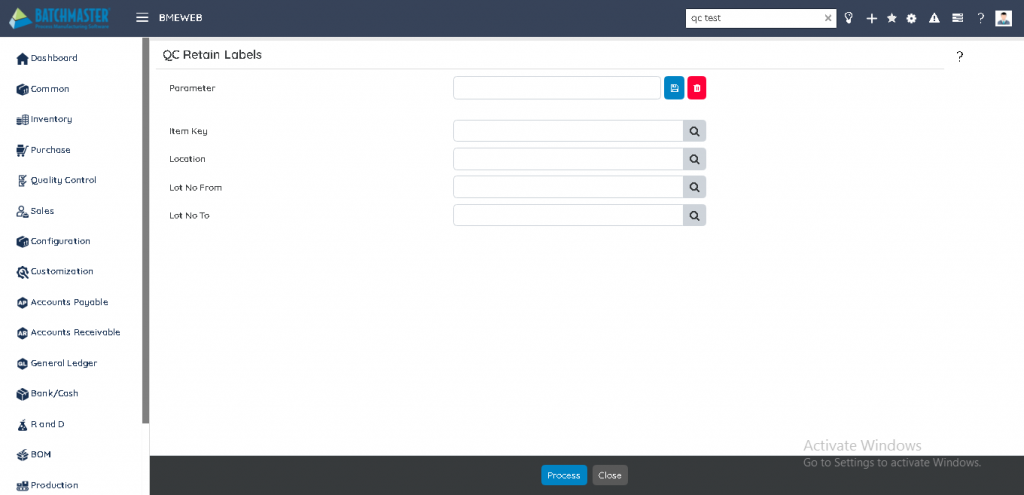
The QC Retain Labels lets you print QC Labels. The QC Retain Labels are printed and labelled on the samples that are collected, retained, and maintained for QC. The size of the containers in which the samples are stored is usually small (approx. 2-inch x 3 inch). To fit on the sample container, the QC Retain Labels are printed in a size that can be pasted on the bottle. The labels have the following information printed:
- Item Code & Description with Bar Code
- Lot # with Bar Code
- Expiration Date
- Vendor Lot#
- 4 Lisam Integration
The Lisam ExESS Setup screen is used to define the setup options required to smoothly access and use the Lisam ExESS web services being installed. On the screen you can specify the URL which is required to access Lisam ExESS web services being installed.
You can check this URL on explorer before saving to ensure its working.

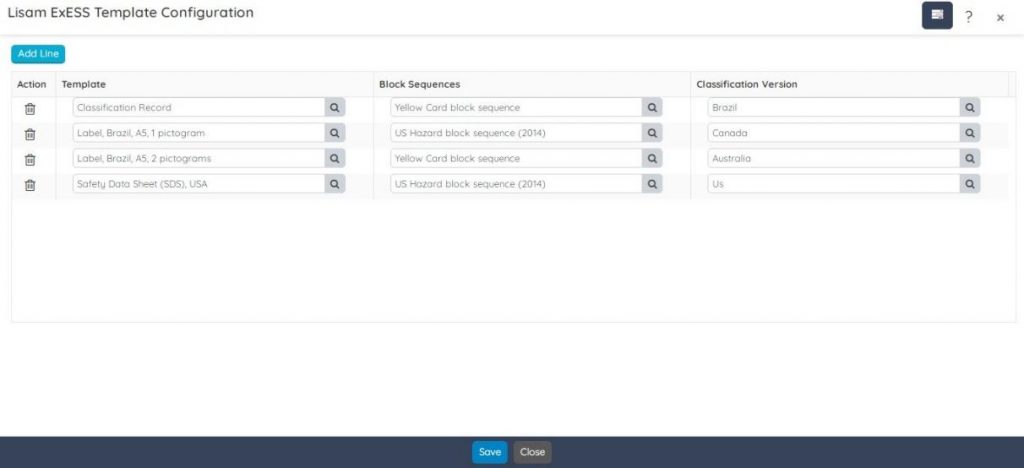
In Lisam ExESS the basic components used to print an SDS are a combination of template, block sequence, and classification version. You can define such required combinations on the Lisam ExESS Template Configuration screen.
In BatchMaster WEB, you can map Lisam ExESS material physical properties with BatchMaster WEB Material physical properties. Thus, on uploading a formula, its mapped material physical properties will also be uploaded to Lisam ExESS.
Only the listed six material properties of Lisam that are visible in the Lisam Excess Property column can be mapped with BatchMaster WEB Material Properties.

- 4.4 Item Master
Upload to Lisam ExESS option is available on Item Master listing page to upload BatchMaster Web items to Lisam ExESS. To print SDS and Labels for item through Lisam ExESS, they are required to be uploaded first.
- 4.5 Formula Entry
On the Formula Entry screen Upload to ExESS button is available to upload FG item and all its associated raw material items to Lisam ExESS.
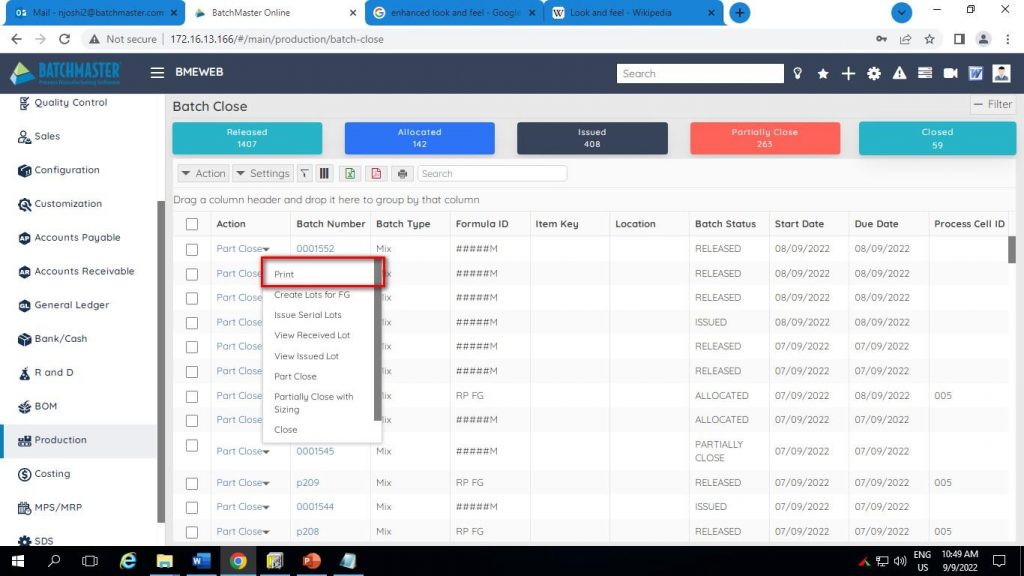
In BatchMaster Web Batch Close screen is used to close a batch. You can Print the batch details using the Print option under the Actions button of the Batch Close listing page.
- 6 Dock Scheduling
- 6.1 Dock Master
Dock is the platform where the transportation unit is loaded or unloaded. Using the Dock Master screen, you can maintain various Dock IDs that can be used to receive or ship the goods. The Doc IDs maintained here can be used further at the time of receiving and shipping the goods associated with the respective Docks.
When creating the dock, you need to specify that dock being created will be used as the receiving dock for pickup, or shipping dock for delivery purpose or else for both receiving and shipping.

- 7 Task Setup
This utility enables the logged in user to view task assigned to him by the administrator corresponding to the active record.

- 7.2 Activity & To Do
The Activity lets you define activities that track business interactions such as phone calls and emails, and business events such as meetings and conferences, giving you a complete view of all your customer interactions. Using this screen, you can define such activities and assign them to several users. BatchMaster WEB provides some predefined activities; you can also define custom activities, if need be.
The To-Do lets you categorize the various tasks assigned to you. BatchMaster WEB provides some predefined categories to organize your tasks, but you can also define custom categories and associate them with the relevant tasks.
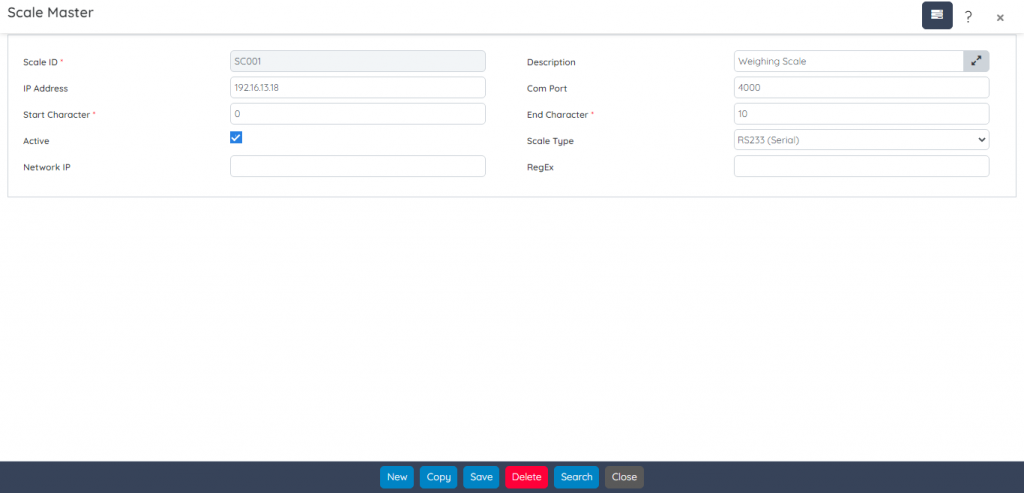
Use this screen to maintain weighing scales and associate them with the IP addresses of the machines where the Scale Agent is installed. You can add multiple scales on a single bin and can configure connection option to connect through Network (Ethernet/Wi-Fi) and specify the Network Scale IP address.
- 9 Production Scheduling
- 9.1 Batch Ticket
The Batch Ticket screen lets you modify batches that are not yet closed. From this screen you can:
- Issue materials
- Hold a batch
- Modify raw materials, byproducts, finished goods or intermediate items, or contractual job work items
- Return issued materials (BOM and formula items)
- Make various other changes to the batch
