

BMW 8.72.45
Index – BMW 8.72.45
| S. No. | Enhancements | Details |
| 1. | Update Report | Introduced Update Report |
| 2. | Scale functionality on FG Receipt | Enhancements on FG Receipt screen |
| 3. | Modifications on Product Cost Analysis screen | Removed filter for approved and added filter for pending
|
| 4. | Modifications on Laboratory Setup | Status lookup now allows multiple selection |
| 5. | Modification on User Group Setup screen | Added Sampling in Group Type Combo |
1 BMW 8.72.45
A new set of enhancements to improve and refine the existing product capabilities. It offers functionalities which are focused on enhancing end-user productivity.
1 Enhancement Details
1.1 Update Report
A new Update Report is introduced in BatchMaster WEB where you can generate the details of what has been updated to finance or not.

1.2 Scale functionality on FG Receipt
BatchMaster WEB now provides the capability to use the weighing scale on the FG Receipt screen. To attain accurate weight measurement of any inventory item, a weighing device is needed that can be integrated well with the BatchMaster WEB application. The measured item weight via the weighing scale acts as a precise input to the system for accurate weighing result calculations.
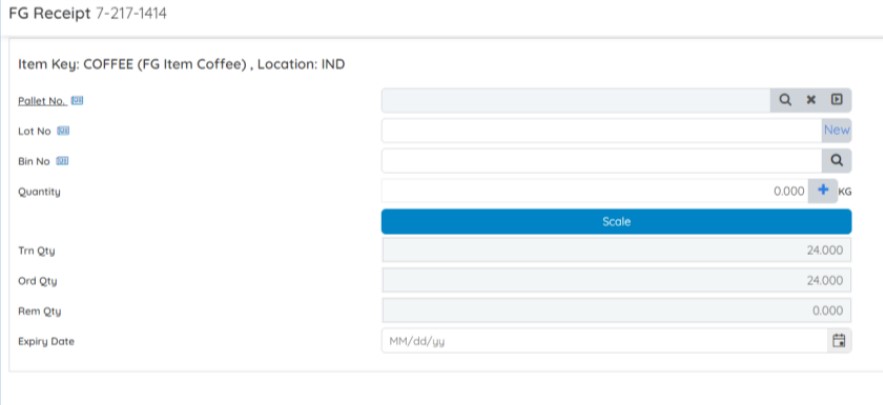
For implementing the same you need to set the parameters on the Module Setup screen. With the Scale Integration option, you can enable/disable scale functionality for issuing material on FG Receipt.

Also, set the encryption and verification of the installed scale for EBT as HTTP or HTTPs using the Scale Installed On option.

1.3 Product Cost Analysis
The Product Cost Analysis screen is specifically designed to perform a cost analysis of an existing formula. In this release, we have made the GUI Changes i.e., changed the Product Cost Analysis dashboard layout and design to make it more user-friendly. Discontinued the Approved filter option and introduced a new Pending option.

1.4 Laboratory Setup
The Lot Status lookup on the Laboratory Setup screen is enhanced to restrict multiple formula statuses on the Physical Properties Analysis screen. The lookup attached to the Formula status not allowed in Physical Properties Analysis field obtains all the formula statuses maintained in your database for restriction. You can select single or multiple statuses as per your business requirement.

1.5 User Group Setup
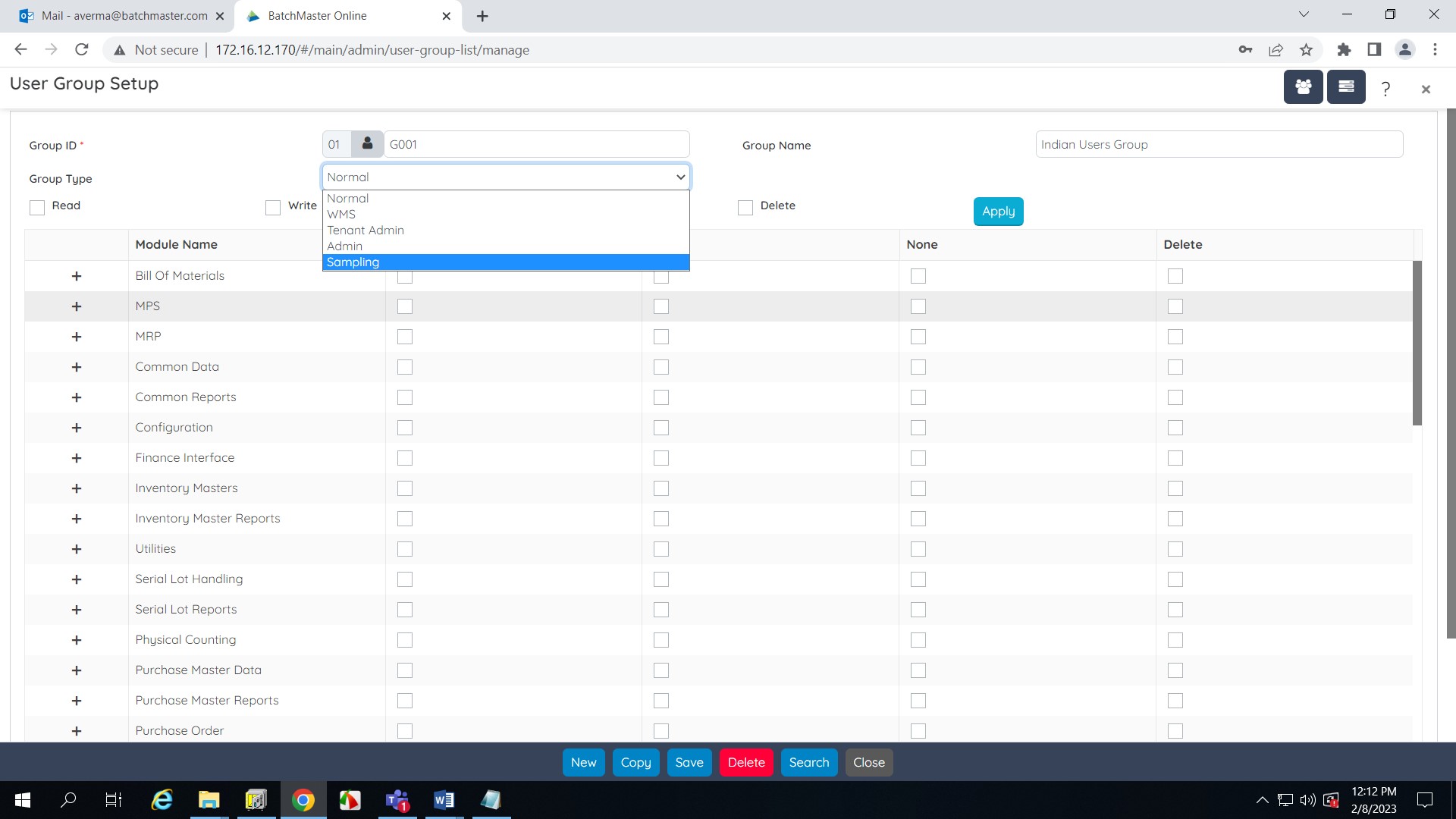
The Group Type field on the User Group Setup screen is now enhanced with a new Sampling option. The users belonging to this User Group will have access to the Sampling module of the BatchMaster WEB.
| S. No. | Enhancements | Details |
| 1. | General Ledger Module | Introduced two new screens:
· Balance Sheet screen · Income Statement screen |
| 2. | Sales Report Module (WMS Profile) | New COA Report |
| 3. | Configuration Module | New Document Tag Setup screen |
BatchMaster WEB is now enhanced to seamlessly generate financial statements for reporting assets, and liabilities and get insights into your financial performance with options like balance sheets and income statements. Meet the compliance requirements to ensure that the product specifications are appropriate and tested by the COA Report. Manage Document Tags to effortlessly retrieve documents. See More…
1. Enhancement Details
1.1 General Ledger Module
The General Ledger module contains several screens for displaying and managing distinct finance information. Two new Balance Sheet and Income Statement screens are introduced that help the end user to manage/compare/export the financial data with ease.
1.1.1 Balance Sheet
The Balance Sheet screen generates a statement/summary of financial balances in comparison with the previous years. This is basically used for comparison purposes and helps the company to get the financial details at a specific point in time.
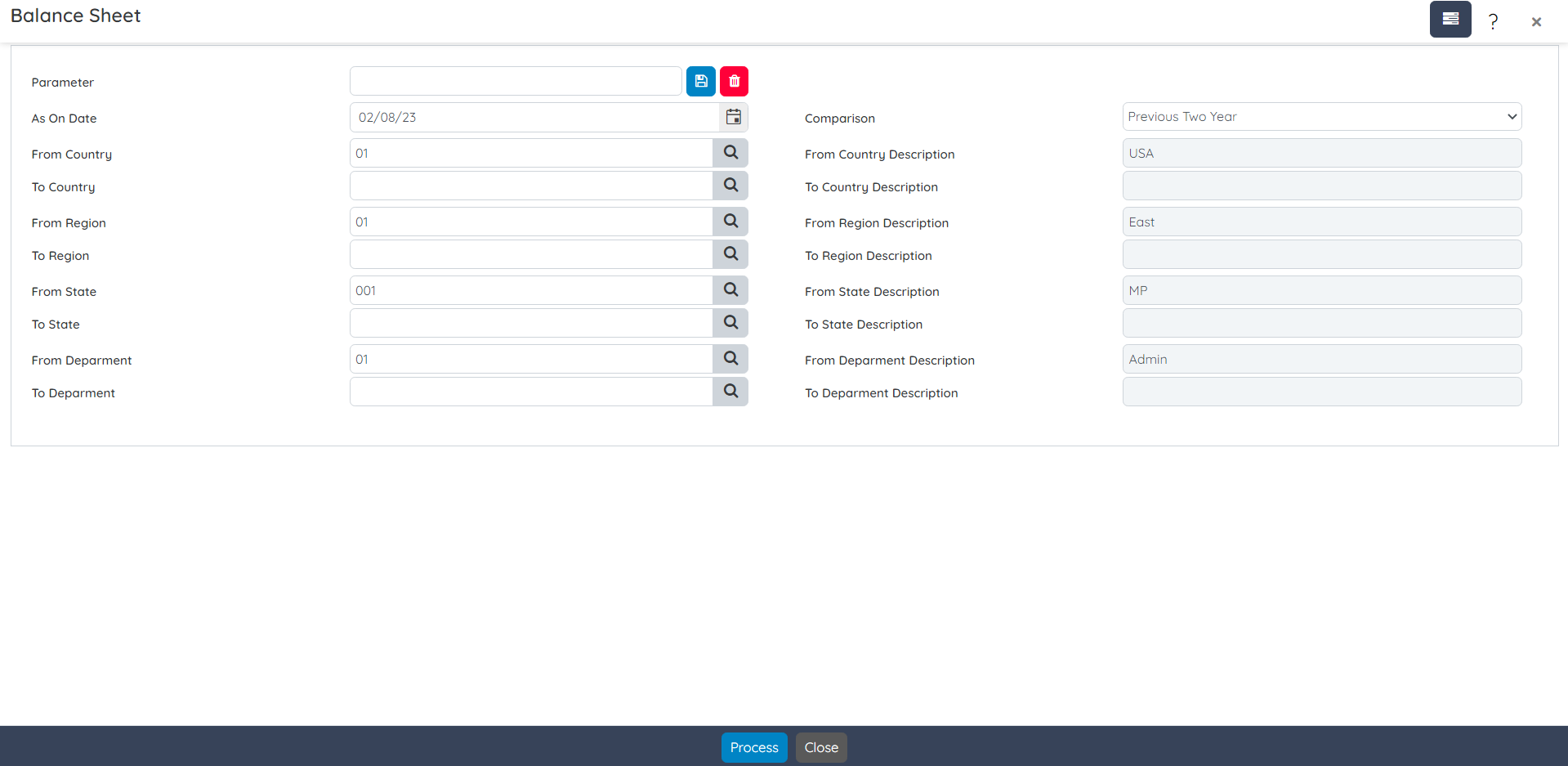
The generated statement/summary can be exported to an excel sheet or PDF file format.

1.1.2 Income Statement
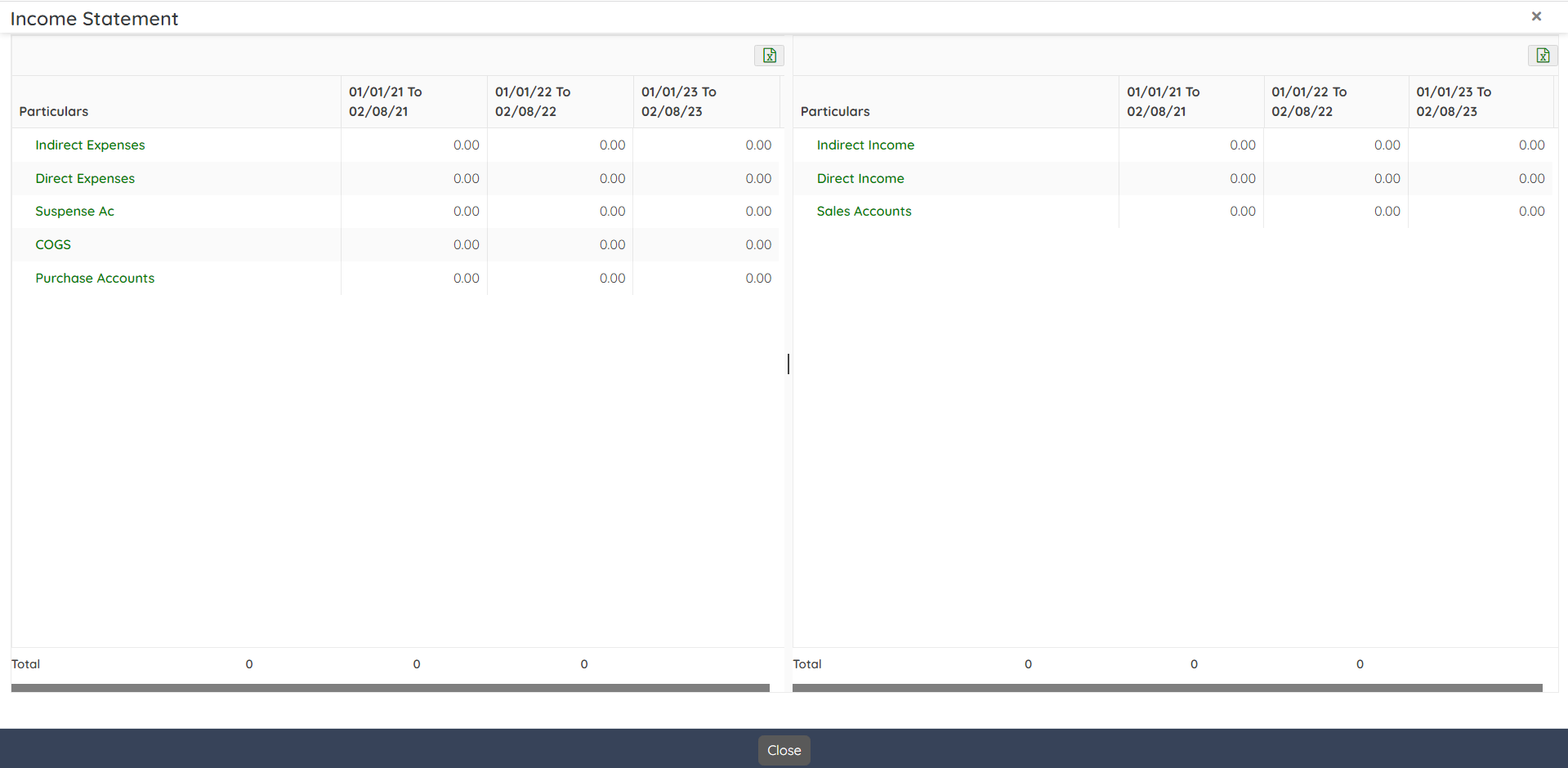
The Income Statement screen generates the income statement of a company for a selected period in comparison with the previous years. This is basically used for viewing the financial performance of the company over a specific accounting period.

The generated statement/summary can be exported to an excel sheet.
1.2 Sales Report Module (WMS Profile) – COA Report
You can print the Certificate Of Analysis report from the Sales Report module under the WMS profile. Generate this report to meet the quality standards of the inventory items.

1.3 Configuration Module – Document Tag Setup Screen
A new Document Tag Setup screen is introduced in the Configuration module of the BatchMaster WEB. Create maximum of 5 user-defined tags to search an element in any document of the BatchMaster WEB database.

Index – BMW 8.72.45
| S. No. | Enhancements | Details |
| 1. | SOP Implementation via SOP Configurator | Introduced a new screen as SOP Configurator and implemented the same on different screens |
| 2. | Quote Layout Setup | New Quote Layout Setup screen |
| 3. | Box Master | New Box Master screen |
| 4. | Laboratory Item Defaults | New Laboratory Item Defaults screen |
| 5. | Modification on Super Invoice | Removed Select All and Unselect All buttons and provided a check box on the grid header to select all/unselect all |
BMW 8.72.45
BatchMaster WEB aims to guide you throughout each release with exclusive new screens and expansion to the standard functionalities.
1 Enhancement Details
1.1 SOP Implementation via SOP Configurator
A new SOP Configurator screen has been introduced at BatchMaster WEB where you can associate Standard Operating Procedures to a number of BatchMaster WEB screens. SOP is Standard Operating Procedure used to set or established the set of procedures to be followed in carrying out a given operation or in a given situation.
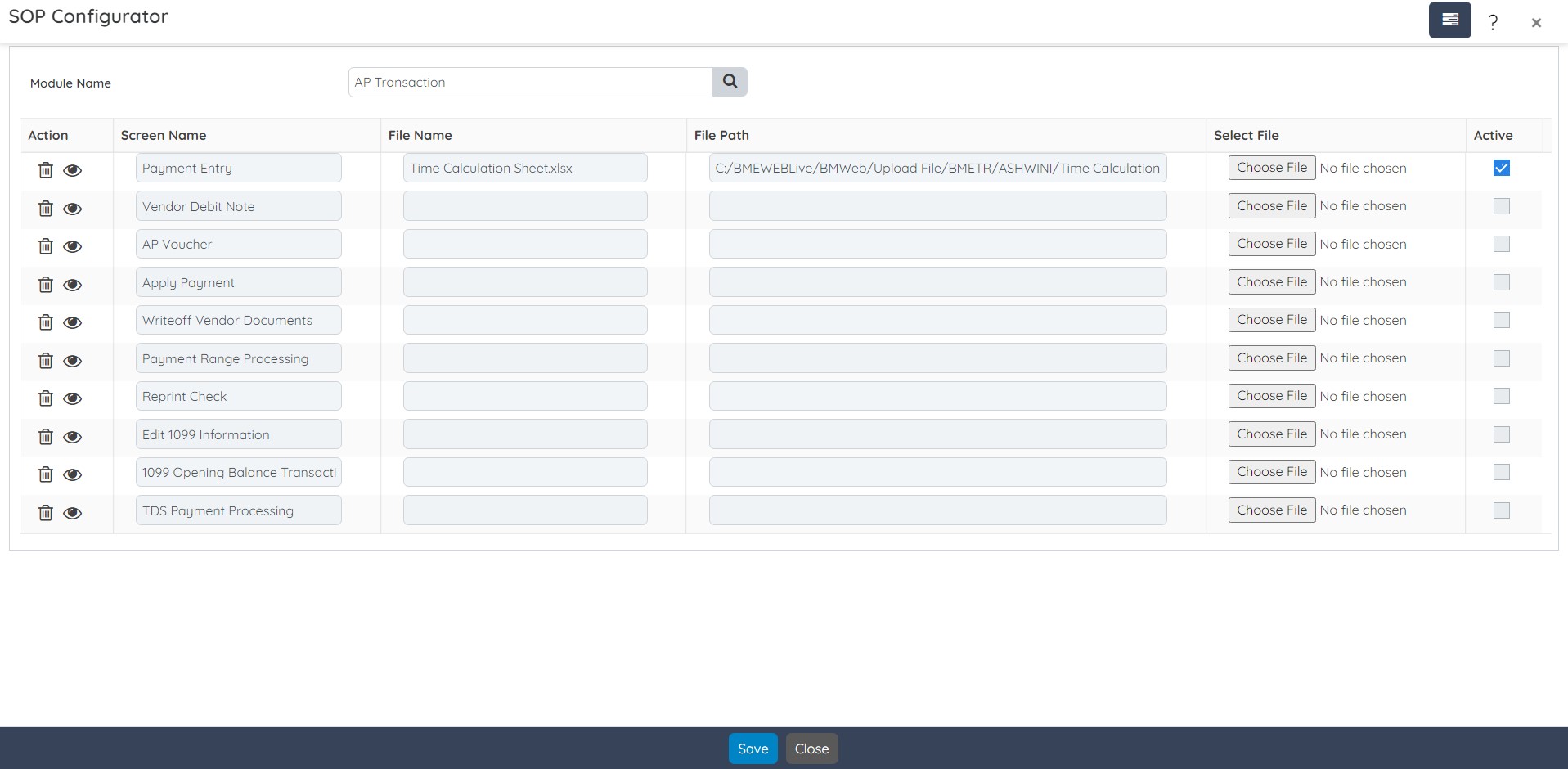
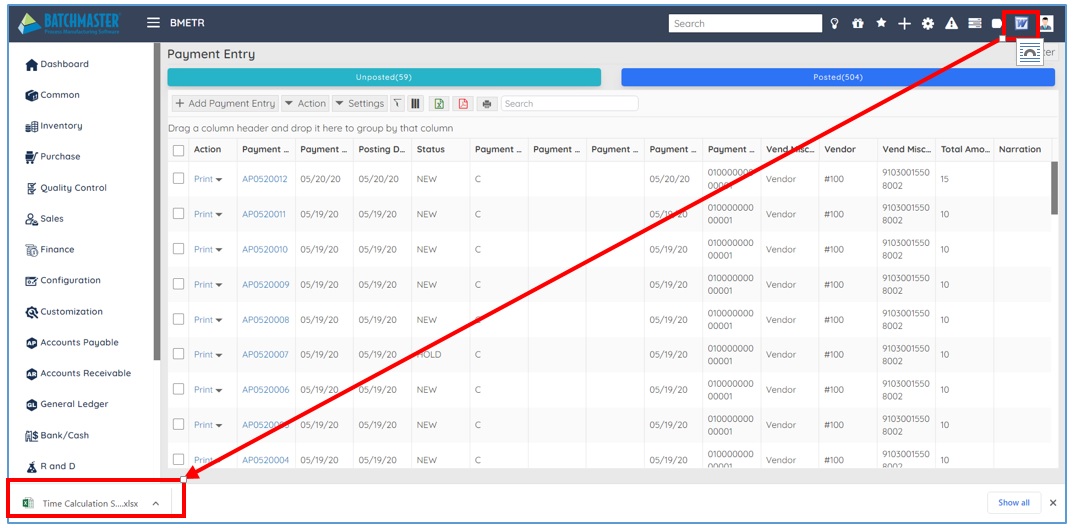
The specified SOPs are attached to the selected screens. The SOP button appears on the selected screen’s dashboard, and will download the associated SOP when you click the SOP option.
1.2 Quote Layout Setup
A new Quote Layout Setup screen has been introduced at BatchMaster WEB where you can set the draft for mail (or Request for Quote) to be sent to vendors. Here you can also create a default email template for the email that is to be sent to different vendors.

1.3 Box Master
A new Box Master screen has been introduced at BatchMaster WEB where you can define box types in which you wish to pack the Item(s) that fulfill the sales picking workflow. Sales picking requires packaging of sales order-associated item(s) before shipping them.

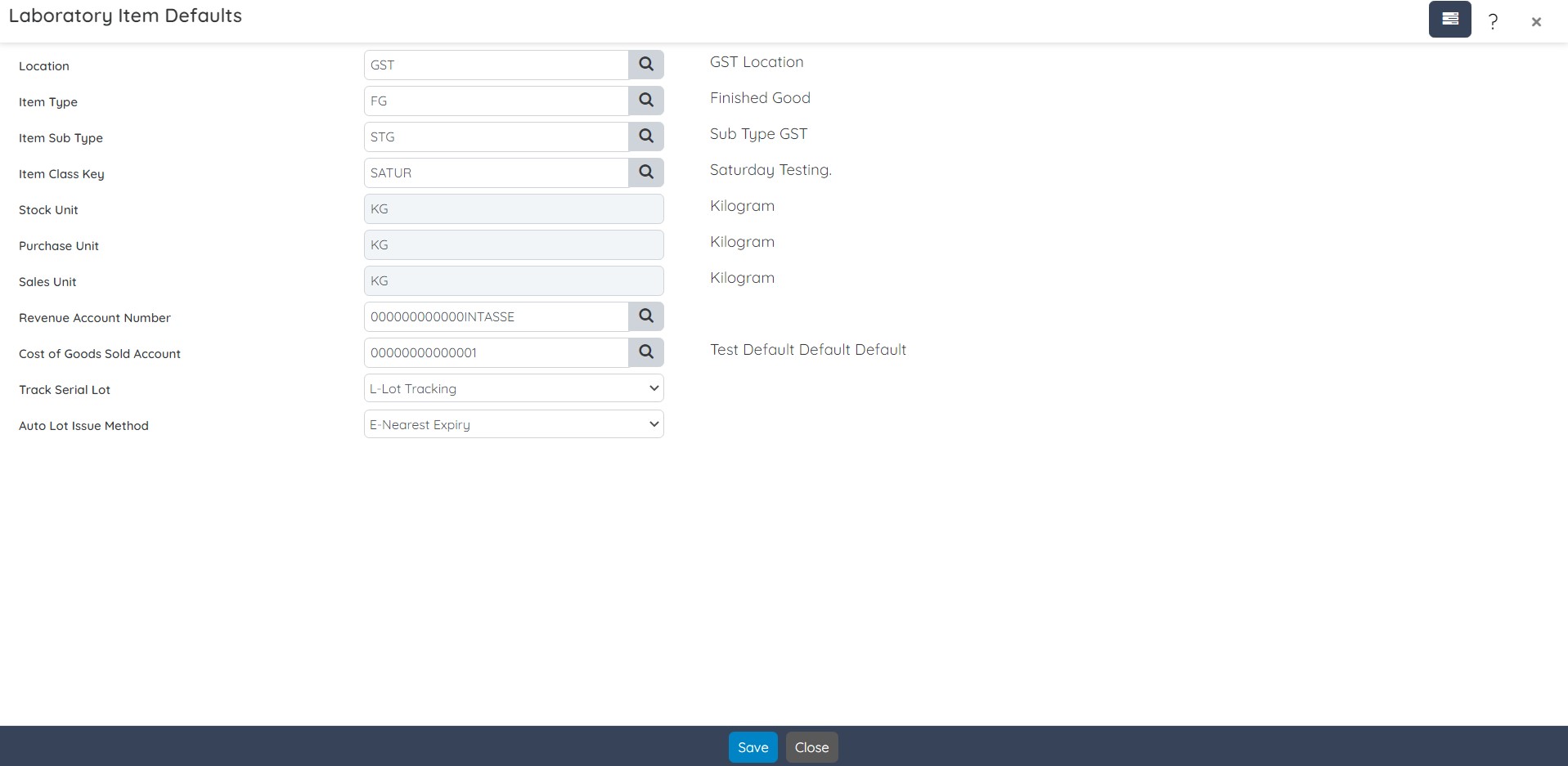
1.4 Laboratory Item Defaults
A new Laboratory Item Defaults screen has been introduced at BatchMaster WEB where you can define default settings required for the creation of new laboratory material item(s).
1.5 Modification on Super Invoice
The Super Invoice screen is specifically designed to create a single invoice for multiple sales orders or shipments for a single customer. In this release, we have made the GUI Changes i.e., changed the Super Invoice dashboard layout and design to make it more user-friendly. Introduced a new checkbox on the grid header to select/unselect all grid listings on a single click.
Index
| S. No. | Enhancements | Details |
| 1. | Apply 2FA Security on Login | BME WEB Login Process Time-Based One-Time Password (2FA) |
| 2. | UDF Extender | UDF Master screen |
| 3. | Modification on Transfer SO to Batches screen
|
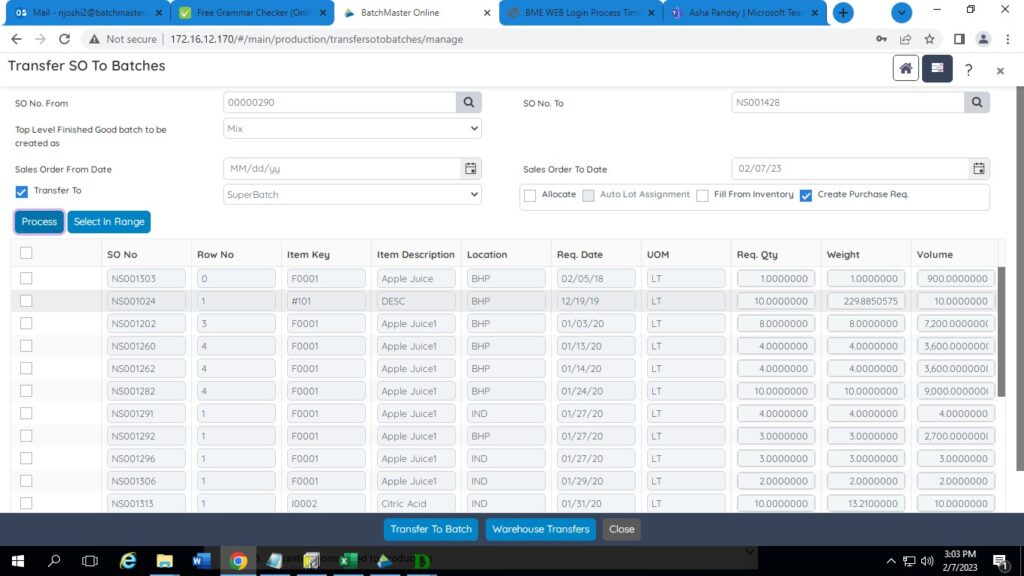
Removed select all/unselect all and provided check box on grid heading.
Moved Select in Range after Process, Move Transfer buttons to Bottom Toolbar |
| 4. | Modification on Query Analyzer | Warning for No Lock. |
| 5. | Modification on Module Setup | Two options for Default Lot Size on Purchase Receipt and FG Receipt screen |
| 6. | List Action – Sales Order Entry screen | Go to option for Transfer SO to Batch |
| 7. | Modification on Serial Lot Maintenance screen | Lot Search by Feature at Serial Lot Form for Negative Transaction. |
| 8. | Change of Special Function Icons on various screens | · Budget Maintenance –> Account Selection
· Batch Ticket –> Allocate · Purchase Order Entry –> Archived Order and Assign Dimension ID · Purchase Order Receipt –> Assign Dimension ID · Sales Order Entry –> Archived Order
|
BMW 8.72.45
BatchMaster WEBs enhancements are targeted to expand the standard functionality that boosts usability of the application. Quite a few screens and functionalities are streamlined with simplified interface and enhanced capabilities.
Enhancement Details
1.1 Apply 2FA Security on Login
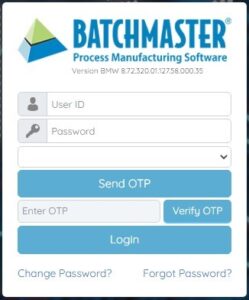
BatchMaster WEB supports multi-tenant deployment with a Normal/Time-Based One-Time Password (2FA) login process with the user’s registered Mobile/Email. The user can proceed to sign in to the BatchMaster WEB account with the provided credentials/generated OTP.
The Administrator of BatchMaster Web is authorized to create and manage several enterprise accounts called tenants. And the tenant can implement Time-Based One-Time Password (2FA) authentication for its users. It includes two different authentication factors to verify account login to access the web application with the provided credentials/generated OTP.

1.2 UDF Extender
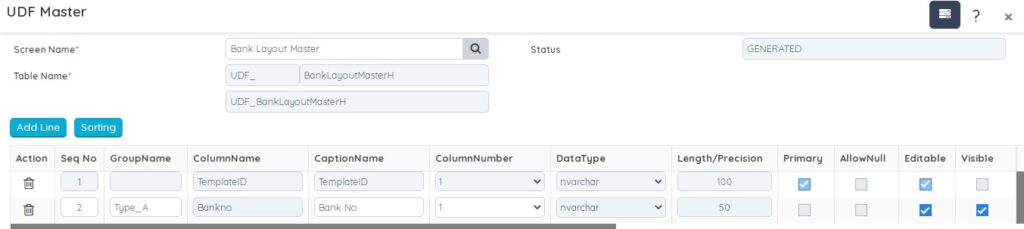
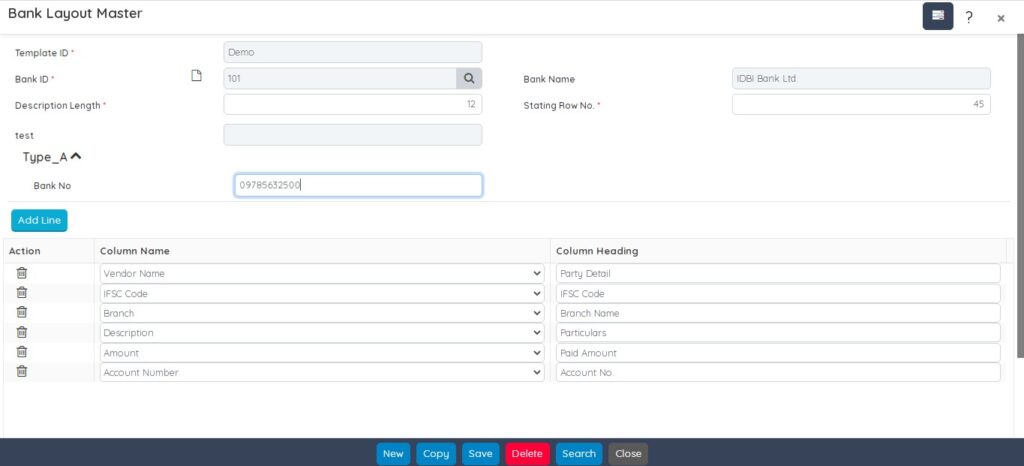
BatchMaster Web provides a simple user interface that allows creation of new fields within the application very quickly and easily. The process is simple and yet much more robust, once you have created new user-defined data entry fields you are now able to treat them just like every other data entry field of the BatchMaster Web screen. The system would populate User Defined fields (attached to any screen in BatchMaster Web) on the independent screen to insert the required data.
The UDF Master screen allows you to customize the system based on your needs. You can add as many unique user-defined data fields on different screens, with different captions under different groups. The UDFs can be added on any screen along with a header and grid if present.
1.3 Modification on Transfer SO to Batches screen
Improved design of the Transfer SO to Batches screen without changing its behavior.
1.4 Modification on Query Analyzer
In BatchMaster Web the Query Analyzer screen provides a consolidated view of the query and the execution details that results in improved performance of the web application.
One can visualize and monitor the query performance with the NOLOCK hint. The system refrains you opt for the NOLOCK query by a warning message. It allows SQL to read data from tables by ignoring any locks and therefore not get blocked by other processes.

1.5 Modification on Module Setup
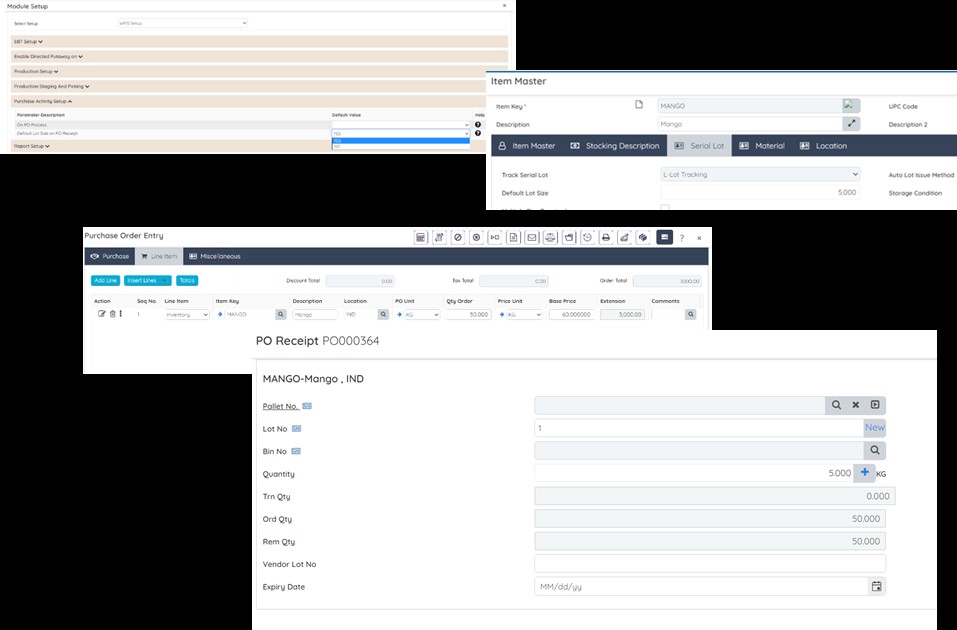
In BatchMaster Web the WMS Setup option under the Module Setup screen is enhanced with two different options to decide whether to obtain the default lot size on purchase receipts /finished goods receipts or not.

While performing the PO or FG Receipt, the system will suggest the lot quantity considering the order quantity and default lot size as defined on the Item Master, whichever is less.
1.6 List Action – Sales Order Entry screen
The Sales Order Entry Dashboard is now enhanced with a new line action option as Go To Transfer To Batch. Using this option, you can directly move on to the Transfer SO To Batches screen to create production batches against any SO.

1.7 Modification on Serial Lot Maintenance screen
BatchMaster Web now provides the capability to search lots based on the lot feature values defined while adjusting any negative quantity. The Serial Lot Maintenance screen provides a special function as Select Lot Features that enables you to obtain the lots for transactions based on their features.

Thus the system automatically selects the lots for the transaction which meet the lot feature value selection criteria.

1.8 Change of Special Function Icons on various screens
Icons when used suitably work faster than words and becomes a strategic form of communication. Maintaining this theme Special Functions Icons of the following screens are updated.
1.8.1 Budget Maintenance > Account Selection

1.8.2 Batch Ticket > Allocate

1.8.3 Purchase Order Entry > Archived Order & Assign Dimension ID.

1.8.4 Sales Order Entry > Archived Order

1.8.5 Purchase Order Receipt > Assign Dimension ID