

BMW 8.72.47
Index – BMW 8.72.47
| S. No. | Enhancements | Details |
| 1. | Dock Scheduling: Modification on the tooltip of the Dock Scheduler window | The caption of the Shipping Contact No. is changed to Carrier Contact No. Accordingly, the changes are applied on the following dashboards:
· Maintain Shipment · Purchase Order Receipt · Warehouse Transfer Out Move · Warehouse Transfer In |
| 2. | Dock Scheduling: Modification on the Schedule Dock window functionality | The City, and State fields defaults from the selected Order No. Accordingly, the changes are applied on the following dashboards:
· Maintain Shipment · Purchase Order Receipt |
| 3. | Scaling functionality | The functionality is included on the RM Issue screen. |
| 4. | BI Master GUI Enhancements | · Functions added – Delete, Refresh, and Close.
· The caption of the Aggregator is changed to Measure. |
BMW 8.72.47
A variety of enhancements are introduced to increase the efficiency and effectiveness of different processes and functionalities.
1 Enhancement Details
1.1 Dock Scheduling: Modification on the tooltip of the Dock Scheduler window
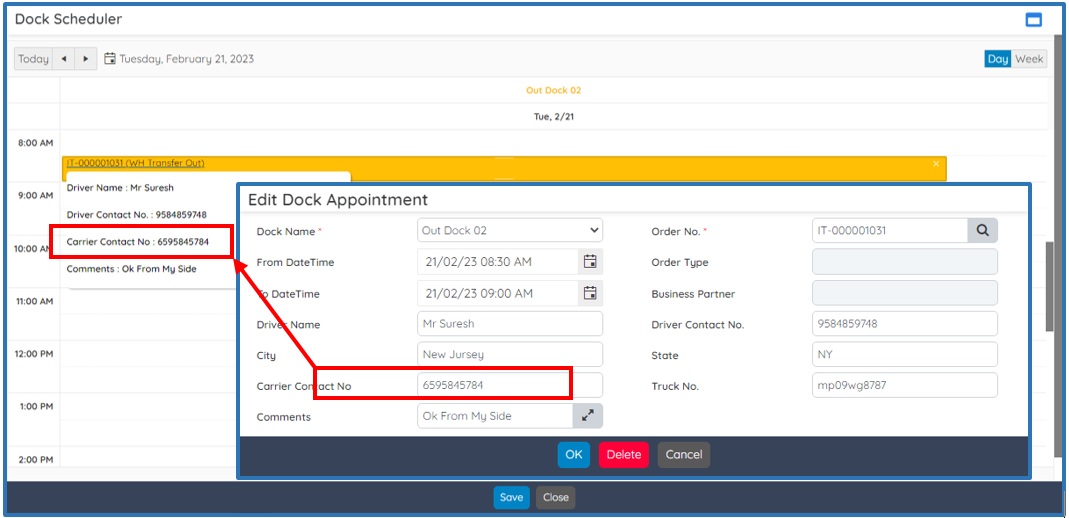
On the Dock Scheduler window, now the caption of the Shipping Contact No. is changed to Carrier Contact No. The Carrier Contact No at the tooltip gets defaulted from the Edit Dock Appointment screen.
Say for instance, at the WH Transfer Out & Move dashboard click the Dock Scheduler icon to open the Dock Scheduler window. Hover the mouse pointer at the respective WH Transfer Schedule to view its associated Carrier Contact No.
The changes are applied on the following dashboards:
- Maintain Shipment
- Purchase Order Receipt
- WH Transfer IN
- WH Transfer Out & Move
1.2 Dock Scheduling: Modification on the Schedule Dock window functionality
In BatchMaster WEB Dock Scheduling is used by shippers, carriers, or else suppliers to manage the dock scheduling at a location to avoid delay in supply.
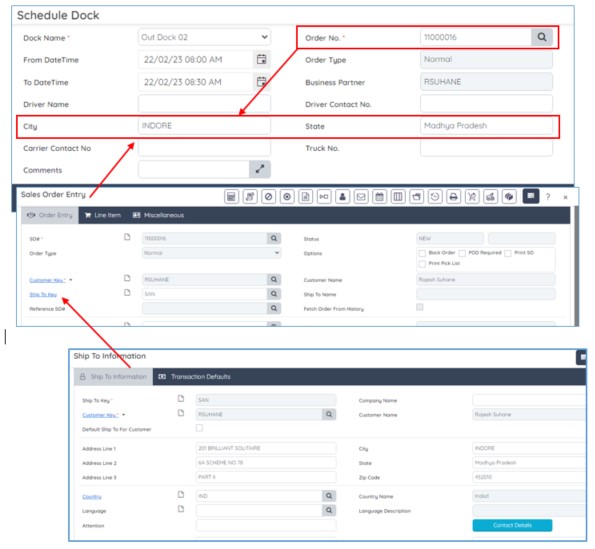
Now, at the Schedule Dock screen to avoid any location discrepancies, the City, and State fields default from the selected Order Number. The changes are applied on the following dashboards:
- Purchase Order Receipt
- Maintain Shipment
1.3 Scale functionality on RM Issue
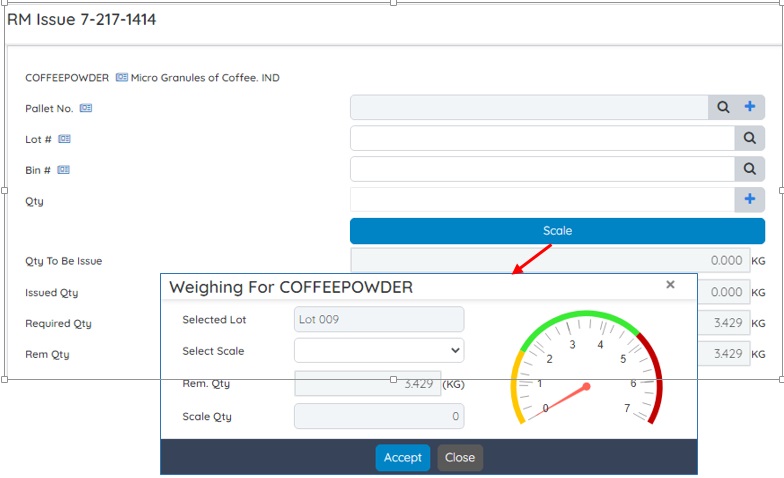
BatchMaster WEB now provides the capability to use the weighing scale on the RM Issue screen. To attain accurate weight measurement of any inventory item, a weighing device is needed that can be integrated well with the BatchMaster WEB application. The measured item weight via the weighing scale acts as a precise input to the system for accurate weighing result calculations.
1.4 BI Master GUI Enhancements
BatchMaster WEB now supports different functions on the BI Master screen – Delete, Refresh, and Close. Further, the caption of the Aggregator is changed to Measure.
