

BMW 9.01.544.01.000.01.000.16
Table of Contents
- Remarks Column in Report Selection for Web Designer
- Automatic Item Label Report Printing on RM Weighing Submission
- Restriction on Adding New Items in WMS Profile for Warehouse Transfer Documents
- Transaction Type Addition for Bill-To/Ship-To e-Way Bill Compliance
- Export & Import Facility for Vendor Items/Quotes
- Comments Field Remains Active Until Line Closure
- Multi-Selection Lookup Datatype
- Lookup List Datatype
- Verification on RM Issue
- Configuration Details
- WMS RM Issue Screen UI Enhancements
- Enhanced Traceability with Doer & Verifier Details in EBT – Material Issue
- Angular Framework Upgrade (Version 18 → Version 21)
- Enhanced Lot Selection Control in EBT – Material Issue
- Unit Conversion Enhancement: Removal of Item Class Level Option
1. Remarks Column on Report Selection for Web Designer
In BatchMaster Web, several reports support multiple printing or generation options. To accommodate these variations, the system maintains multiple backend .rpt files for a single report, ensuring the correct layout or logic is applied based on the selected option.
While this approach ensures functional accuracy, it introduces usability challenges when you attempt to modify reports using the Telerik Report Designer.
In the existing system, when a report has multiple backend .rpt files, all associated files are displayed in the Report Selection for Web Designer screen with the same Report Screen Name. As a result, you can see multiple entries with identical names. Selecting the correct report for modification becomes confusing and error-prone. To resolve this ambiguity, a new Remarks column is now introduced at the Select Report Lookup available on the Report Selection for Web Designer screen.
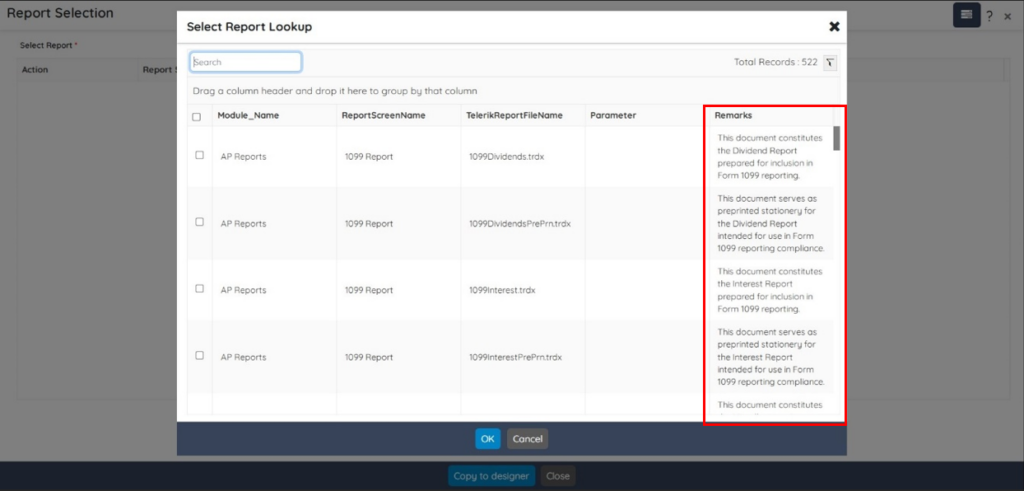
This enhancement provides additional, descriptive information for each .rpt file, enabling you to clearly differentiate between multiple backend .rpt files associated with the same Report Screen Name. A similar enhancement is introduced at the Report Upload Download screen as well.
2. Automatic Item Label Report Printing on RM Weighing Submission
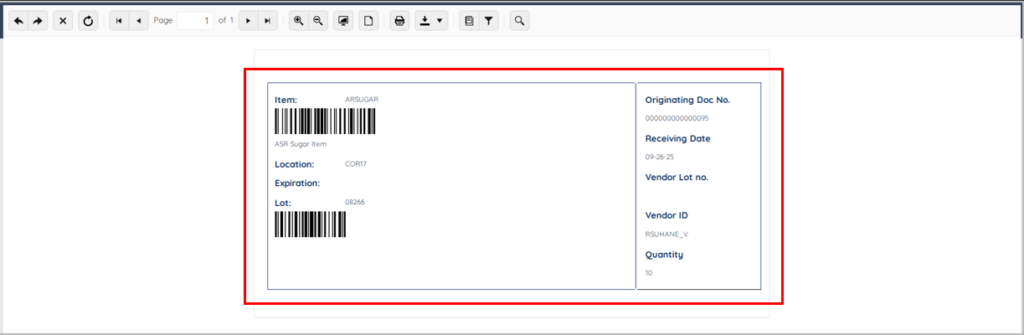
A new enhancement is now introduced to the RM Weighing screen. When you tap the Submit button on the RM Weighing screen, the system now automatically prints the Item Label Report for the weighed raw materials.
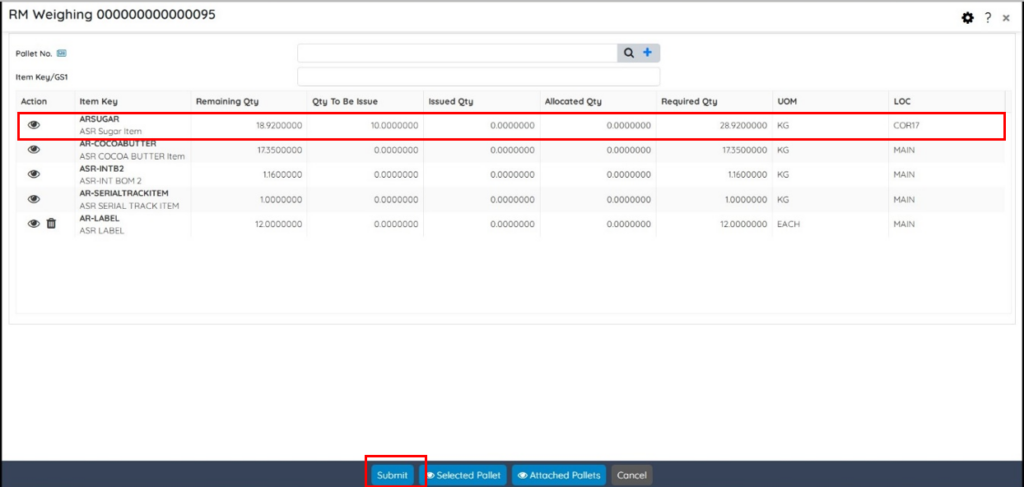
On the RM Weighing screen, tap the Submit button. The system now automatically prints the Item Label Report for the weighed raw materials as shown below:
3. Restriction on Adding New Items in WMS Profile for Warehouse Transfer Documents
A new enhancement is now introduced for Warehouse Transfer Out and Warehouse Transfer Move transactions. When a document is created from a Normal Profile and later accessed from the WMS Profile, you are no longer allowed to add new item lines to the document.
However, you can still:
- Add new lot(s) for the existing item keys
- Delete existing lot(s) from the existing item keys
This enhancement helps in maintaining the document integrity between profiles while still allowing necessary lot-level adjustments within existing items.
4. Transaction Type Addition for Bill-To/Ship-To e-Way Bill Compliance
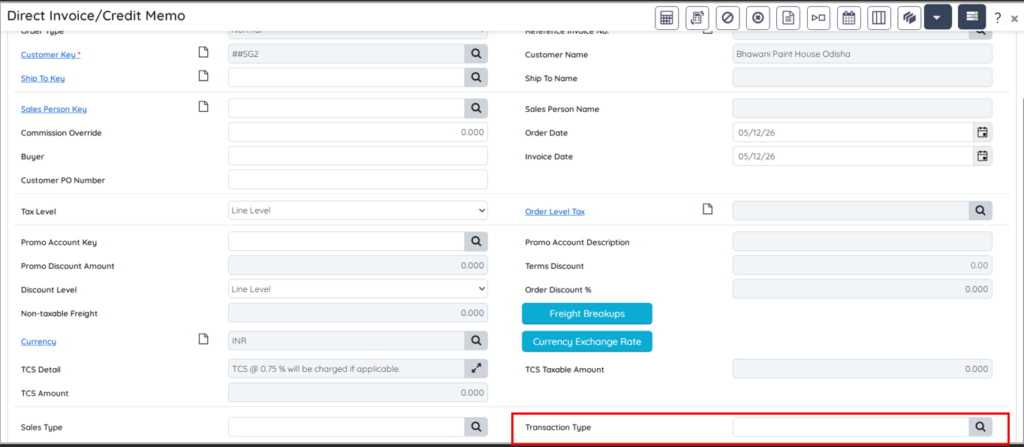
A new enhancement is now introduced in the Sales Order Entry and Direct Invoice/Credit Memo screens to comply with the latest e-Way Bill advisory. For Bill-To/Ship-To transactions, the “Ship To GSTIN” field is now mandatory during e-Way Bill generation. To support this requirement, a new Transaction Type field is now added on the following screens:
Sales Order Entry
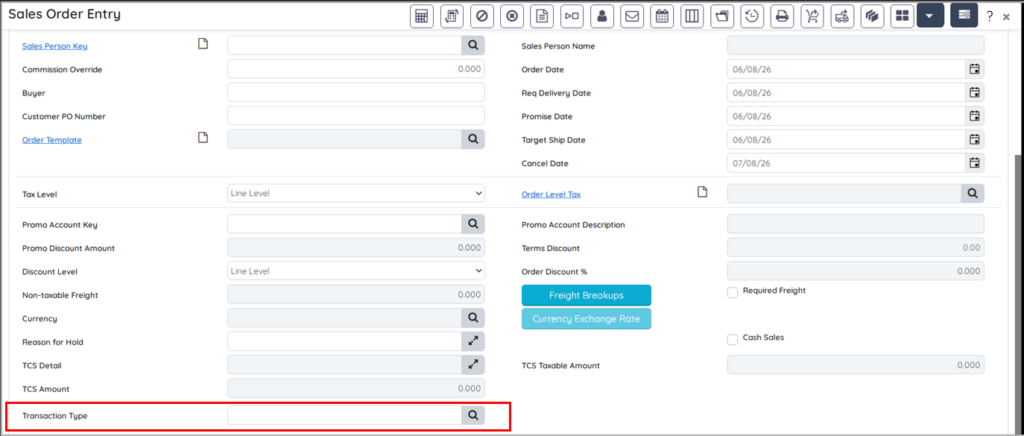
Direct Invoice/Credit Memo screen.
5. Export/Import Facility for Vendor Item/Quote
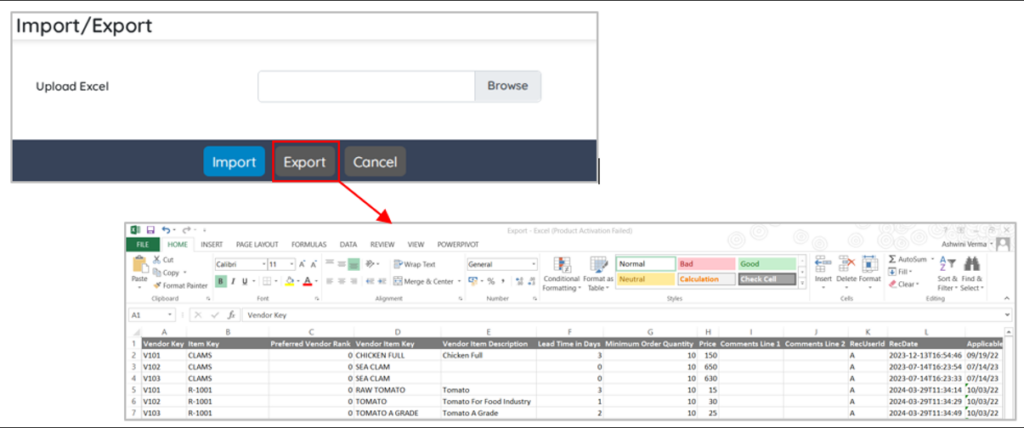
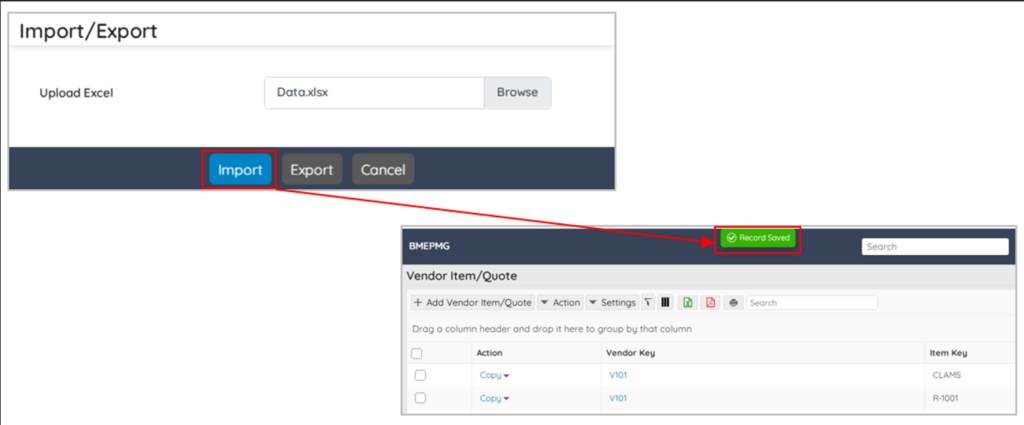
A new Export/Import Facility for Vendor Item/Quote management is introduced to simplify and streamline bulk data handling using Excel templates. This feature enables you to efficiently manage large volumes of Vendor Item/Quote records with minimal manual effort.
Users can now:
-
Export existing Vendor Item/Quote records into an Excel file.
-
Import bulk Vendor Item/Quote records using a predefined Excel template.
-
The Import/Export option is available under the Action menu on the Vendor Item/Quote screen.
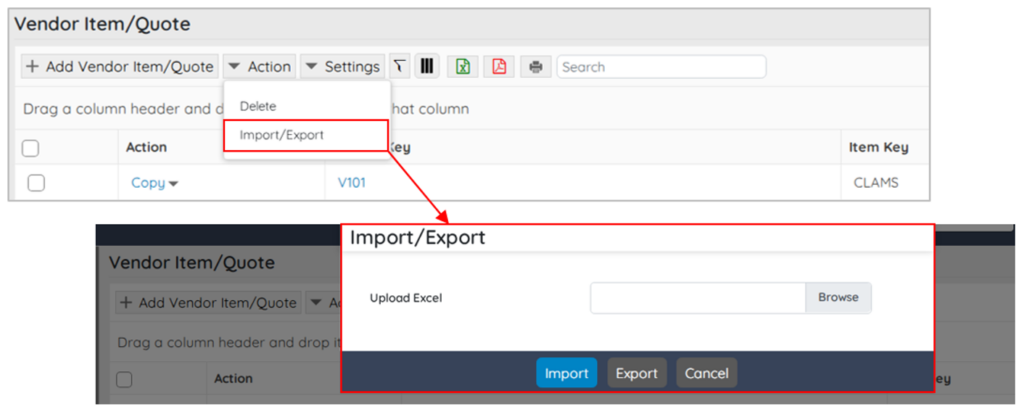
This enhancement enables faster bulk record creation and updates by allowing users to export existing Vendor Item/Quote records and import bulk data using Excel templates. It helps reduce manual effort, minimizes data entry errors, and improves overall operational efficiency in Vendor Quote management.
6. Enhancement: Comments Field to Remain Active Till Line Is Open
The Comments field on Purchase Order Entry and Sales Order Entry screen’s line items tab used to get disabled once any partial or full quantity was received for purchase order or delivered for the sales order. This made it restricted to add remarks during partial receipts/shipments while the line was still open.
With this enhancement, the Purchase Order Entry screen’s line Comments field will remain editable till the line is open for receiving. Similarly, the Sales Order Entry screen’s line Comments field will remain editable till the line is open for delivering. Once the line closes, the Comments field will get disabled. This is applicable to the following screens:
Purchase Order Entry screen – Line Item Tab
The Purchase Order Entry screen’s line Comments field will remain editable till the line is open for receiving.

Purchase Order Entry screen – Edit Line Item Screen
Navigate to Edit Line Item screen through Purchase Order Entry screen. The line Comments field will remain editable till the line remains open for receiving.
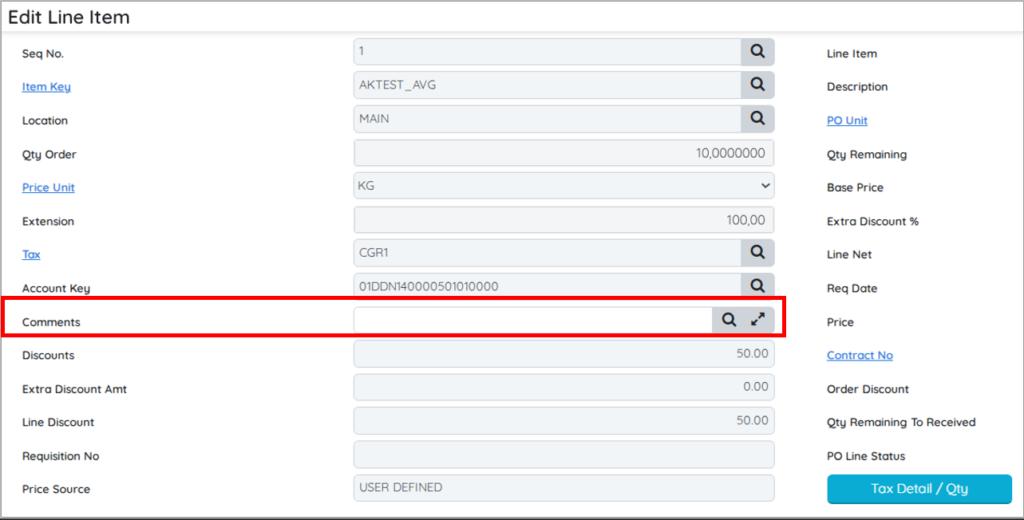
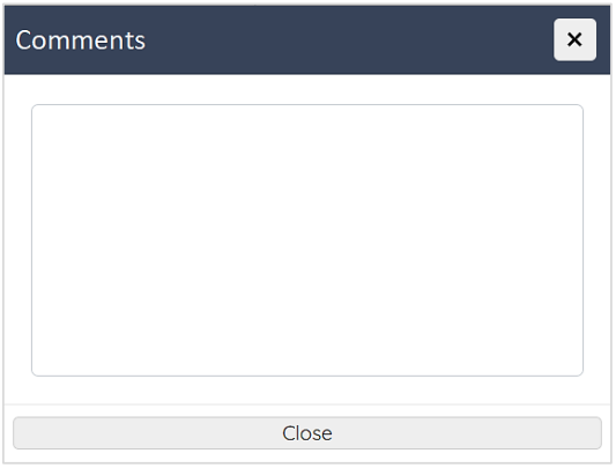
On the above screen, when you will click the Expander  button, the system will open a pop-up window that will allow you to enter and update comments.
Sales Order Entry screen – Line Item Tab
The Sales Order Entry screen’s line Comments field will remain editable till the line is open.

Sales Order Entry screen – Edit Line Item Screen
Navigate to the Edit Line Item screen through Sales Order Entry screen. The line Comments field will remain editable till the line is open for shipment.
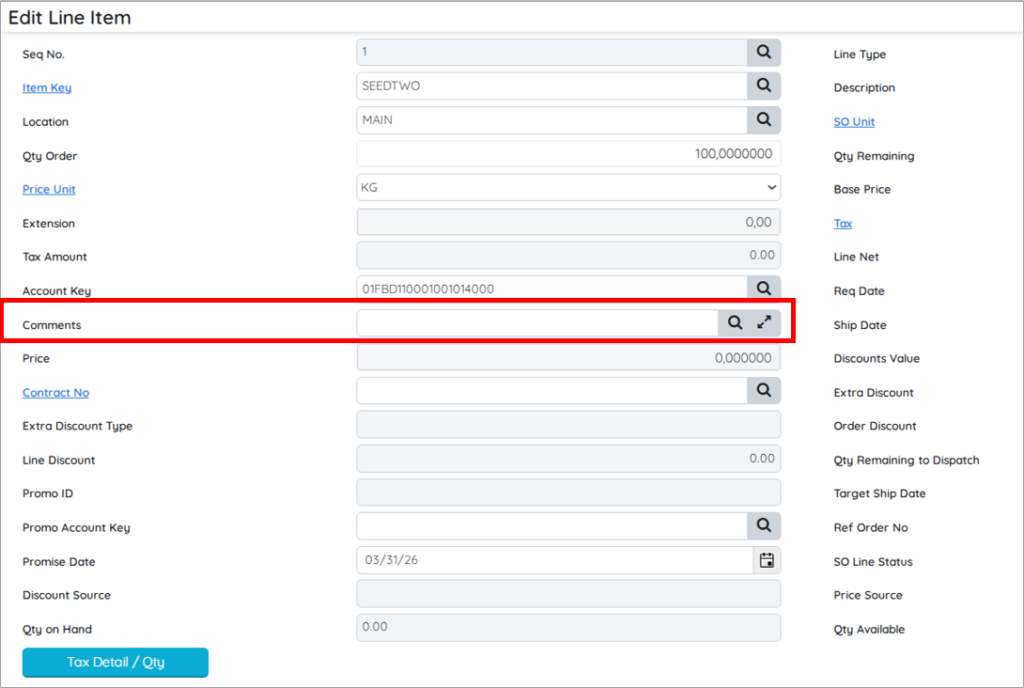
In the above screen, when you click the Expander button, the system will open a pop-up window that will allow you to enter and update comments.
Overall, this enhancement facilitates adding ongoing, process‑related comments during partial processing. It strengthens traceability and improves communication across procurement, sales, and logistics teams.
7. Datatype for Multi Selection Lookup
A new datatype, Lookup List, is now introduced to allow adding of multi-selection lookup. This datatype allows you to retrieve and select multiple records from a configurable lookup based on a user-defined query. The Lookup List data type:
- Enables multi-selection of lookup records
- Allows custom query definition for lookup data retrieval
- Provides a controlled selection experience.
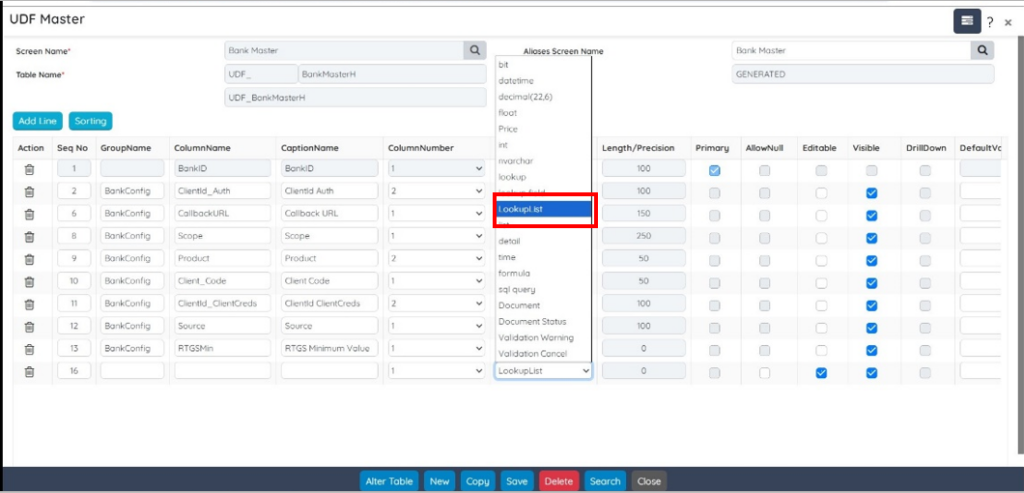
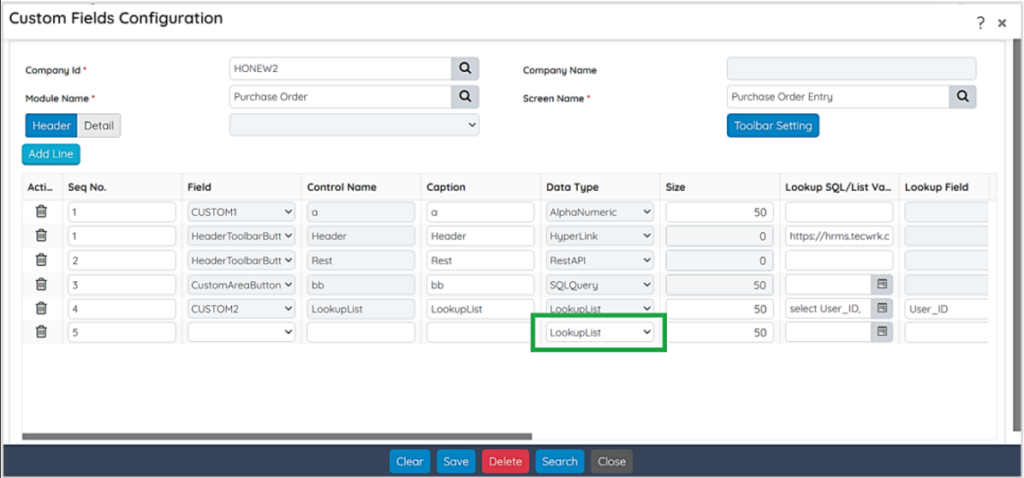
Lookup List DataType
When you set the datatype of a field to Lookup List, the system enables the following functionality:
- You can define a query to determine the data displayed in the lookup window.
- The lookup supports multi-record selection through checkboxes.
This new LookupList data type is provided on the following screens:
- Custom Master Design: The Custom Master Design screen is now enhanced with a new LookupList DataType.
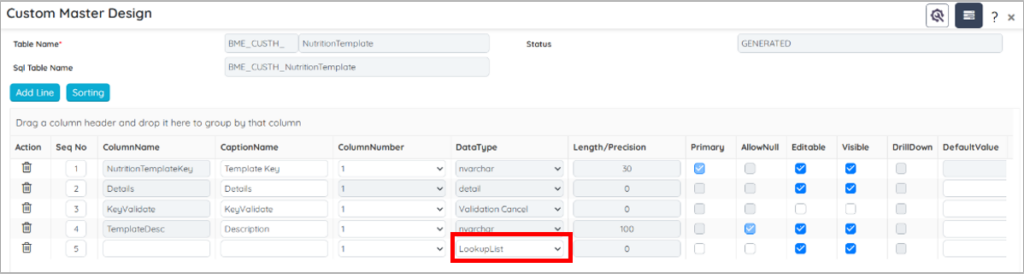
- UDF Master: The UDF Master screen is now enhanced with a new LookupList
- Custom Field Configuration: The Custom Fields Configuration screen is now enhanced with a new LookupList
8. Verification on RM Issue
To improve accuracy, transparency, and process control in Raw Material (RM) issuing, a verification mechanism has been introduced at the WMS RM Issue screen. This enhancement ensures that RM issue transactions are validated by verifier before final submission.
Configuration Details
A new Allow Verification on RM Issue is now introduced on the Module Setup screen for enabling verification on the RM Issue screen. This setting is used to choose if verification is required during the Raw Material (RM) Issue process. Based on the selected value, the system either allows RM to be issued directly or enforces verification by a verifier before completion.
GoTo: WMS Setup -> WMS Setup Option -> Production Setup Section -> Allow Verification on RM Issue field
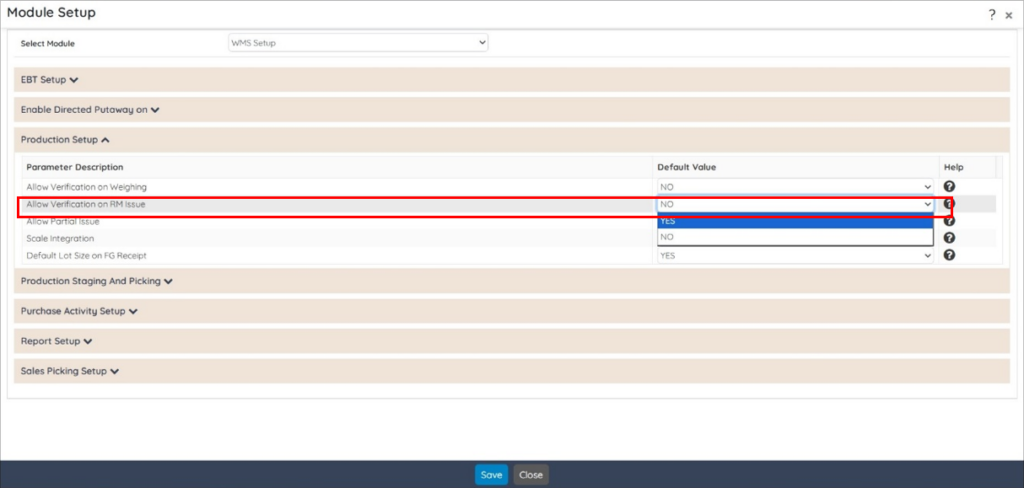
The Allow Verification on RM Issue dropdown provides two options:
- NO: This is the default selection provided for backward compatibility. When selected, the system behaviour remains unchanged and Raw Material (RM) can be issued without any verification from WMS RM Issue screen. No verifier credentials are required during the RM Issue process. This option is provided to allow uninterrupted continuation of existing RM Issue workflows where verification is inapplicable.
- YES: When selected, verification becomes mandatory for RM Issue. The RM Issue transaction cannot be completed unless it is verified by another user. The system validates the verifier’s User ID and Password before allowing the transaction to proceed. This option is provided to enforce dual-user control and ensure accuracy, accountability, and improved process control during RM Issue transactions.
UI Enhancements – WMS RM Issue Screen
Below two new fields get displayed at the RM Issue – Lot Selection screen, if you select Yes option for the Allow Verification on RM Issue dropdown located at the Module Setup screen.
- User ID: Used by the verifier to enter User ID.
- Password: Used by the verifier to enter the login password.
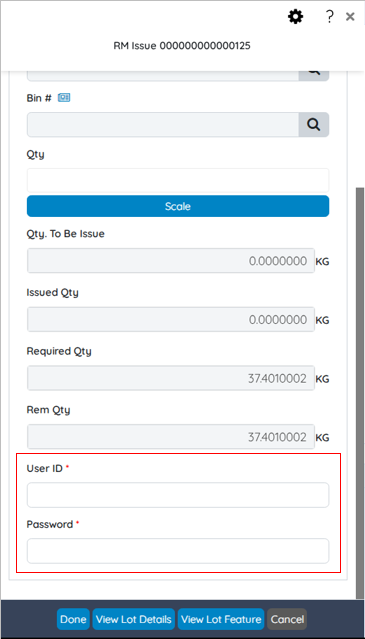
 On clicking the Done button, the system checks whether Verifier’s User ID and Password are entered. If either field is missing or invalid, the system restricts you to proceed further. Selected lot and quantity can only be added upon successful User ID and Password verification.
9. Enhanced Traceability with Doer and Verifier Details in EBT – Material Issue
The Doer and Verifier information was only visible on the Selected tab of the EBT Issue screen. The EBT Issue screen’s Issued tab is now enhanced with the Verified, Verified By, and Issued By fields for traceability and audit checks.

- Verified: This field displays whether a record has been verified or not. Displays Y for verified records and N for records not verified. This helps you to quickly identify the verification status of the record, ensuring accuracy and control in the record review process. This is a read-only field.
- Verified By: This field displays the User ID of the person who performed the verification. This is for providing accountability and traceability by recording who has verified the record. This is a read-only field.
- Issued By: This field displays the User ID of the user who issued the record. This enables you to track the issuer, supporting auditability and ownership of the transactions. This is a read-only field.
Overall, this enhancement provides post‑issue visibility into responsibility and verification status, strengthening accountability and supporting audit compliance across EBT operations.
10. Angular Upgrade – Upgraded Angular from version 18 to 21.
BatchMaster Web has been upgraded from Angular 18 to Angular 21 to align the application with the current Angular framework and modern development standards. This upgrade provides the following benefits:
- Modern Framework Foundation: Aligns the application with current Angular best practices and supported framework capabilities.
- Framework Updates: Incorporates the latest Angular framework updates, including bug fixes, and security updates.
- Improved Maintainability: Modernized framework dependencies simplify ongoing maintenance and support future upgrade cycles.
- Future-Ready Architecture: Provides a strong foundation for adopting future framework updates, product enhancements, and integrations.
11. Enhanced Lot Selection Control in EBT – Material Issue
The override allocated lots feature introduces a configurable control over how lot selection behaves during the material issue operations.
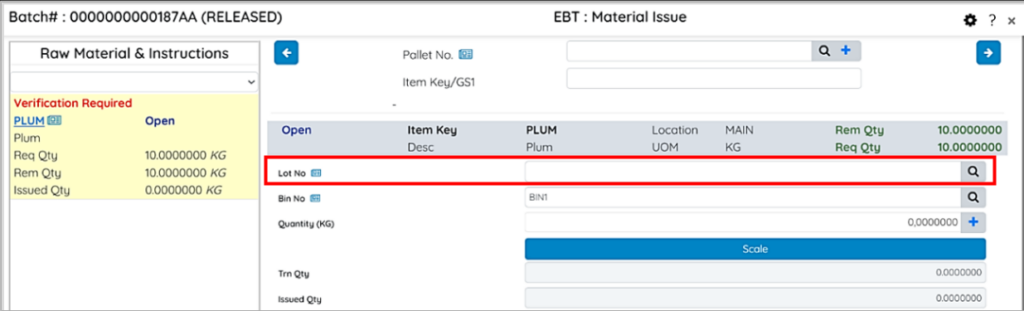
Previously, when an allocated batch was fetched, the system fetched all the available lots, allocated and non‑allocated, at the Lot No lookup field for issuing any of them. Some organizations, however, require firm allocation compliance, prompting the need for a flexible, policy‑based control. This enhancement enables businesses to enforce rules ranging from unrestricted selection, warning selection and strong blocking of non‑allocated lots. With this enhancement:
- A new dropdown field called Override Allocated Lots is now provided at the EBT Setup section of the WMS Setup option in the Module Setup The Override Allocated Lots field is provided to govern lot-selection behaviour at EBT – Material Issue screen.
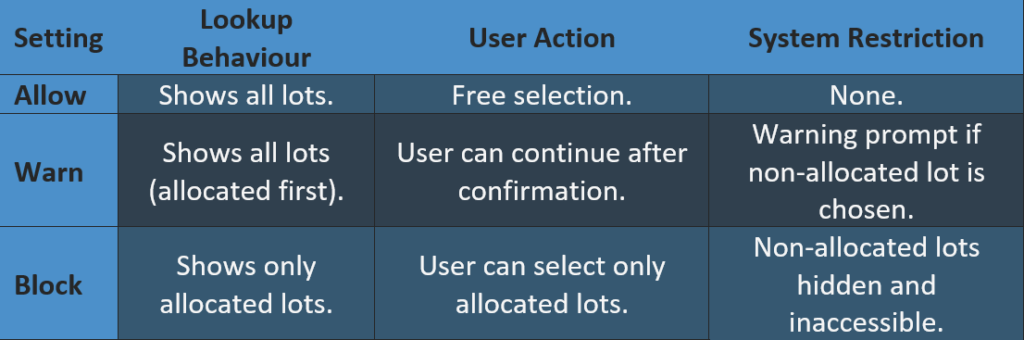
- BatchMaster Web prevents accidental issuance of wrong lots where compliance is critical.
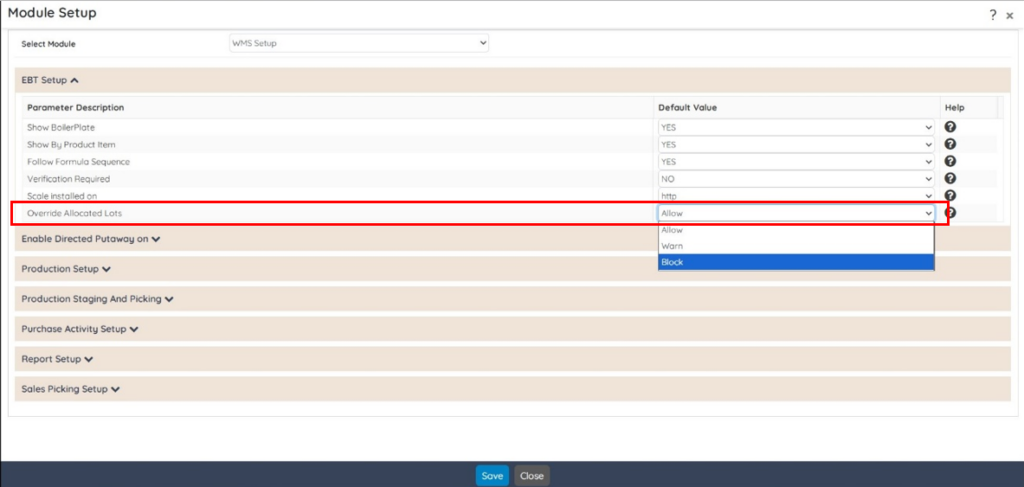
The Override Allocated Lots dropdown provides three options:
- Allow: If this option is selected, the system behaviour remains unchanged. All allocated and non‑allocated lots will continue to appear in the lot lookup of the EBT- Material Issue screen, and you are able to select and issue any of them. For backward compatibility, this option is selected by default.
- Warn: If this option is selected, all allocated and non‑allocated lots appear in the lot lookup; however, the allocated lots appear first, followed by the non‑allocated ones. If you select a non‑allocated lot, the system notifies with a warning message that the chosen lot is not the allocated one. Do you want to continue?. The system proceeds only if you confirm Yes.
- Block: If this option is selected, then only the allocated lots appear in the lot lookup at the EBT- Material Issue Block option is suitable for businesses requiring strict adherence to allocation rules, ensuring zero deviation.
12. Feature Enhancement: Withdrawal of Item Class Level Option from Unit Conversion and Change Unit Conversion Screens
The Item Class Level option has been withdrawn from the Conversion Type field of the Change Unit Conversion screen. Additionally, the Item Class Level option has been removed from the Scope dropdown of the Unit Conversion screen.
Users now have the option to define the unit conversion only at the following levels:
- Item Level
- Global
This change simplifies the unit conversion process by eliminating Item Class level unit conversion maintenance and updates. Existing functionality for Item Level and Global level unit conversion remains unchanged.